
Last updated November 21, 2025
I’ve spent years working closely with both Brevo and ActiveCampaign, pushing their features, testing their limits, and helping countless users understand how to get real results from each platform. This 7,000-plus-word comparison distills everything I’ve learned into a clear, structured guide you can navigate instantly.
Why trust this review? Because my experience isn’t theoretical. I’ve published numerous tutorial videos and walkthroughs that teach people how these platforms actually work in day-to-day use. Those guides have helped thousands of marketers sharpen their skills and get more out of their automation tools. What you’re getting here is the same practical, firsthand insight, gathered in one place and written to help you make a confident, informed choice.
Why trust this review? Because my experience isn’t theoretical. I’ve published numerous tutorial videos and walkthroughs that teach people how these platforms actually work in day-to-day use. Those guides have helped thousands of marketers sharpen their skills and get more out of their automation tools. What you’re getting here is the same practical, firsthand insight, gathered in one place and written to help you make a confident, informed choice.
Brevo vs ActiveCampaign: 1-minute summary
You are comparing Brevo and ActiveCampaign because you are probably looking for two things:
- Email automation features
- CRM/sales capabilities
Although this full article includes more than 7,000 words, the main point is simple. Brevo and ActiveCampaign share many core strengths, including email marketing, SMS tools, automation, and sales and CRM functions. The key difference is cost. ActiveCampaign sits at the higher end of the pricing range. In return, it offers more powerful automation features, which I cover in detail in the full review.
Your choice depends on what matters most for your business. If you want a wallet friendly option, Brevo will appeal to you. If you want the most capable automation system, ActiveCampaign will feel more suitable.
This review is divided into clear sections so you can jump straight to the information you need.
- Brevo vs ActiveCampaign: Video Review
- Brevo vs ActiveCampaign: Pricing
- Brevo vs ActiveCampaign: Free plan
- Brevo vs ActiveCampaign: Newsletter Features
- Brevo vs ActiveCampaign: Email Marketing Automation
- Brevo vs ActiveCampaign: Opt-in Form Features
- Brevo vs ActiveCampaign: CRM & Sales Features
- Brevo vs ActiveCampaign: Landing Page Features
- Brevo vs ActiveCampaign: Transactional emails
- Free limited-time offer
Take advantage of these limited-time offers!
- Brevo: Get 50% off for the first three months! Sign up using my link and enter the code Creatoregg at checkout. Offer valid until [wpcode id=”5614″].
- ActiveCampaign: Receive 6 months of free, personalized email support from me when you sign up using my link. I’ll guide you through setup, optimization, and answer your questions to ensure your success with the platform. Offer valid until [wpcode id=”5614″].
If you want a fast overview of both platforms, you can watch my free tutorial videos for ActiveCampaign and Brevo. You will find the videos below.
Brevo vs ActiveCampaign: Video Review
To complement the in-depth comparison below, I’ve also put together a video review of Brevo vs ActiveCampaign.
Brevo vs ActiveCampaign: Pricing
There is an important point to understand before you compare these two platforms. ActiveCampaign bases its price on the number of contacts in your account. Brevo bases its price on the number of emails you send. These are two very different pricing models, so keep this in mind as you review your options.
If you want the short answer, Brevo is far more affordable than ActiveCampaign. The tradeoff is that ActiveCampaign delivers a more advanced automation system, which I also explain in detail in the full review.
You can explore every pricing detail below. I have arranged this section into smaller parts so you can move directly to the information that matters most to you.
- Different plans
- Price comparison
- Discounts
- Cancellation process
- Refunds
- Number of contacts (subscribed vs. unsubscribed)
- Email credits
Different plans
Brevo
- Free plan (forever free)
- Starter (starting from $9/mo)
- Standard (starting from $18/mo)
- Professional (starting from $499/mo)
- Enterprise (custom pricing)
ActiveCampaign
- 14-day free trial
- Starter (starting from $19/month)
- Plus (starting from $59/month)
- Pro (starting from $89/month)
- And Enterprise (starting from $159/month)
Price comparison
To decide whether Brevo or ActiveCampaign is more cost-effective, start by identifying two things:
- How many contacts you manage
- How many emails you send each month, including automated sequences and regular newsletters
Let’s look at an example: 5,000 contacts and 35,000 emails per month.
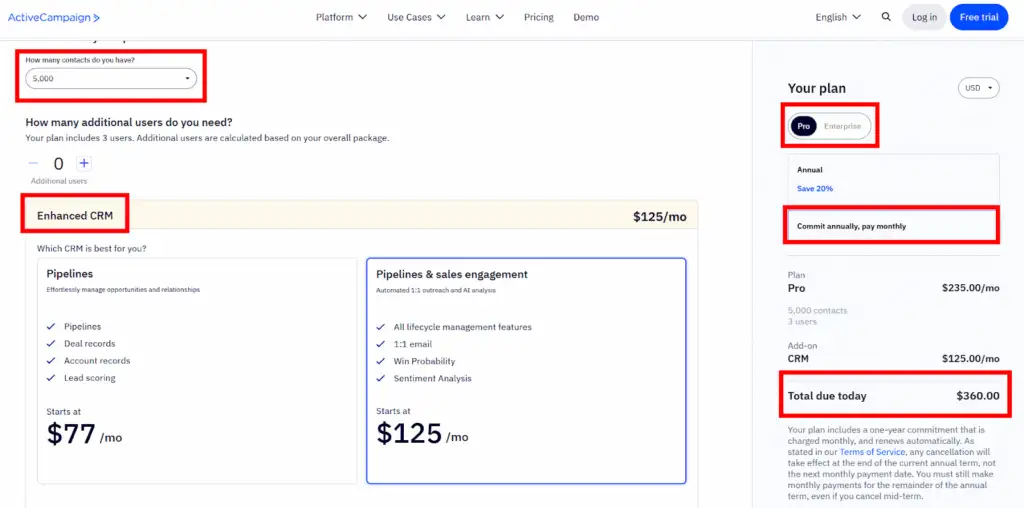
ActiveCampaign price
There’s an important point to understand before comparing the two platforms: ActiveCampaign bases its pricing entirely on the number of contacts in your account, not on how many emails you send.
With 5,000 contacts and roughly 35,000 monthly emails, you’d need:
- ActiveCampaign Pro – $235/month
- Enhanced CRM add-on – $125/month
Total: $360 per month
Brevo price
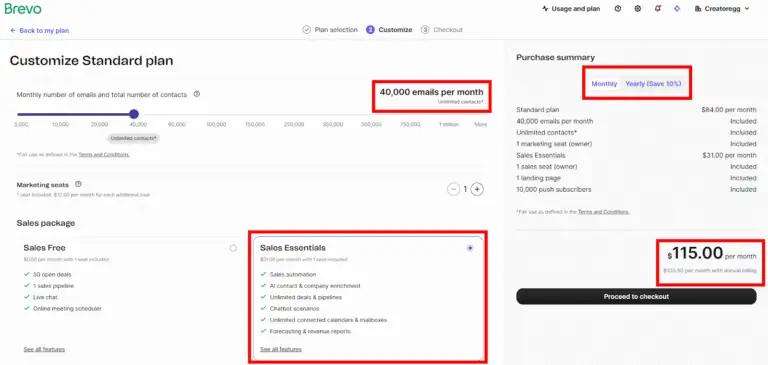
Brevo works differently. Instead of charging based on your contact count, Brevo’s pricing scales primarily with email volume.
For the same usage (40,000 monthly emails tier), you’d pay:
- Email plan – $84/month
- CRM add-on – $31/month
Total: $115 per month
Conclusion
ActiveCampaign is undeniably more expensive but the higher price comes with some benefits: stronger automation capabilities and a more polished overall experience. It also includes 3 user accounts by default, while Brevo’s base plan includes just one.
So yes, Brevo wins on price, but the right choice ultimately depends on which features your business actually needs.
Winner: Brevo
Price graph comparison
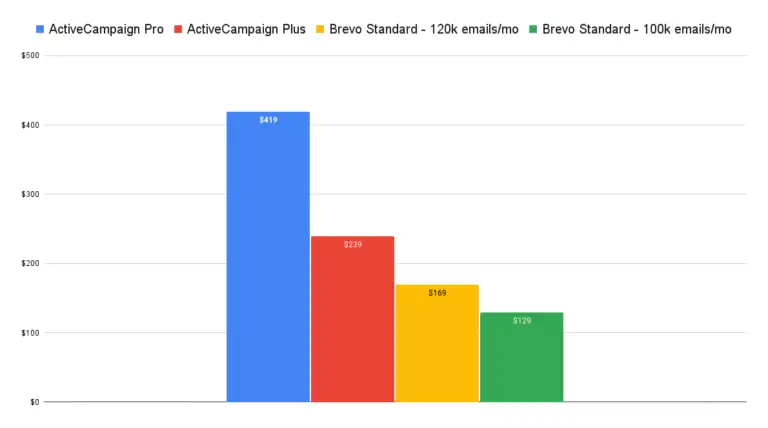
The graph below compares the pricing of ActiveCampaign Plus and ActiveCampaign Pro for 10,000 subscribers. ActiveCampaign uses send-limit multipliers:
- Plus plan: 10× multiplier → 100,000 monthly emails for 10,000 subscribers
- Pro plan: 12× multiplier → 120,000 monthly emails
Brevo, on the other hand, prices its plans primarily on email volume. So for a fair comparison, the graph uses:
- Brevo Standard (100,000 emails per month)
- Brevo Standard (120,000 emails per month)
Both tiers include a 500,000 contact limit, so contact count isn’t a constraint here.
As shown in the graph, ActiveCampaign can be in some cases double the monthly cost of Brevo.
Discounts
ActiveCampaign discounts
ActiveCampaign offers a 20% discount on annual subscriptions. Non-profit organizations can request an additional 20% discount, meaning non-profits can receive up to 40% off when purchasing an annual plan.
Some software companies offer Black Friday or seasonal discounts, but ActiveCampaign does not typically run extra promotions.
Brevo discounts
Brevo offers a 10% discount on annual subscriptions. In the past, non-profits could request a 15% discount on the Enterprise plan, but that information no longer appears on their site, so it may have been discontinued. However, if you are a non-profit, it’s still worth contacting their support team to ask about possible discounts.
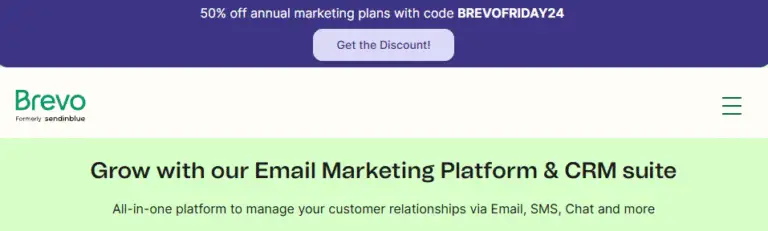
A quick tip: if you want to check whether a SaaS company has offered Black Friday deals in previous years, use the Internet Archive (web.archive.org). For example, Brevo ran a Black Friday promotion in 2024 offering a 50% discount. See the screenshot below.
Winner: Brevo
Cancellation process
Some software tools make canceling your account frustrating, but both Brevo and ActiveCampaign keep the process simple. You can cancel your account online without contacting support.
Winner: It’s a draw
Refunds
Neither Brevo nor ActiveCampaign offers refunds, so make sure to test the software thoroughly before committing to an annual plan. Most SaaS and email marketing tools follow this same policy, often because they already offer a free plan or free trial.
Winner: It’s a draw
Number of contacts (subscribed vs. unsubscribed)
Some email marketing tools charge for both subscribed and unsubscribed contacts, which can significantly increase costs.
Brevo and ActiveCampaign do not charge for unsubscribed contacts, which is great.
Winner: It’s a draw
Email credits
Some email tools offer pay-as-you-go email credits, which can be useful if you send newsletters infrequently.
ActiveCampaign email credits
ActiveCampaign does not offer email credits.
Brevo email credits
Brevo does offer email credits. Prepaid credits never expire and can be used whenever you need them. Packs range from 5,000 credits up to 1 million, and one credit equals one email sent to one contact.
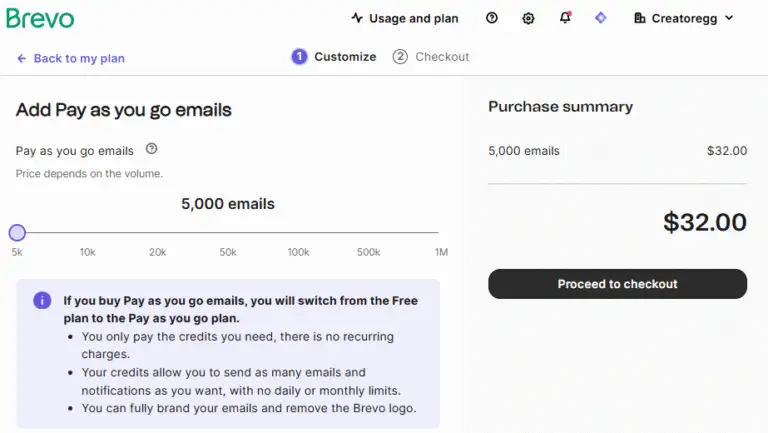
To compare costs, check the table below. It shows the number of email credits in the first column, the total price in columns 2 and 3, and the cost per email credit in columns 4 and 5. Another email marketing tool called Mailchimp is included as well since they also offer email credits.
| Brevo | Mailchimp | Brevo | Mailchimp | |
|---|---|---|---|---|
| 5,000 | $32 | $200 | $0.0064 | $0.0400 |
| 10,000 | $59 | $260 | $0.0059 | $0.0260 |
| 15,000 | x | $390 | x | $0.0260 |
| 20,000 | $95 | x | $0.0048 | x |
| 50,000 | $165 | $1,300 | $0.0033 | $0.0260 |
| 75,000 | x | $1,950 | x | $0.0260 |
| 100,000 | $275 | x | $0.0028 | x |
| 200,000 | x | $2,600 | x | $0.0130 |
| 500,000 | $940 | x | $0.0019 | x |
| 1,000,000 | $1,600 | x | $0.0016 | x |
| 2,000,000 | x | $3,300 | x | $0.0017 |
| 5,000,000 | x | $6,500 | x | $0.0013 |
| 25,000,000 | x | $13,000 | x | $0.0005 |
Winner: Brevo
Take advantage of these limited-time offers!
- Brevo: Get 50% off for the first three months! Sign up using my link and enter the code Creatoregg at checkout. Offer valid until [wpcode id=”5614″].
- ActiveCampaign: Receive 6 months of free, personalized email support from me when you sign up using my link. I’ll guide you through setup, optimization, and answer your questions to ensure your success with the platform. Offer valid until [wpcode id=”5614″].
Brevo vs ActiveCampaign: Free plan
Brevo offers a forever free plan, and ActiveCampaign only provides a 14-day free trial.
Winner: Brevo
Brevo vs ActiveCampaign: Newsletter Features
The conclusion for this Newsletter Features section is that I’d lean slightly toward Brevo as the winner, though it’s a close call. Keep in mind, I don’t mix newsletter features with email marketing automation features. If that’s what you’re looking for, check out the automation features section in this review.
Make sure to test things yourself, too. Brevo offers a full free plan and ActiveCampaign a free trial. And remember to take advantage of my limited-time offers when signing up for Brevo or ActiveCampaign (see details here).
For newsletter features, I’ve organized everything into sections so you can jump straight to whatever is most relevant to you. See below.
- Send limits
- Contact / Subscriber Limits
- Email Builder
- Email Editor
- Email Scheduling
- Remove Branding
- Email Lists
Send limits
ActiveCampaign send limits
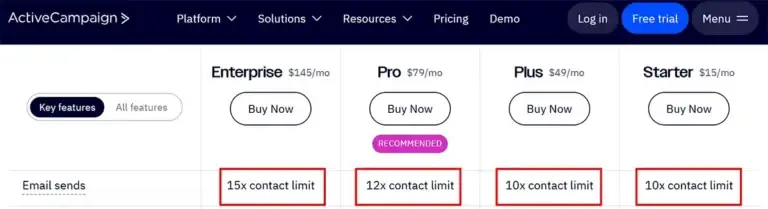
ActiveCampaign uses a multiplier-based send limit system:
- Starter & Plus: 10× your contact limit
- Pro: 12× your contact limit
- Enterprise: 15× your contact limit
If you need more, you can purchase additional sends. (For full details, check ActiveCampaign’s website.)
Brevo send limits
Brevo’s pricing works differently. Instead of charging by the number of contacts, you pay based on how many emails you send per month. Here’s an overview:
- Free plan: Up to 300 emails/day
- Starter tier: 5,000–100,000 emails/month
- Standard tier: 5,000–1,000,000 emails/month
- Professional tier: 150,000–10,000,000 emails/month
- Enterprise tier: Fully customized
However, there’s one important caveat: on lower email plans, your contact limit is capped.
For example:
- Choosing a 5,000 email/month plan limits you to 500 contacts.
- At higher tiers, such as 20,000 emails/month, you regain the full contact limit for that tier.
Conclusion
Because Brevo and ActiveCampaign structure their plans and send limits so differently, there’s no true one-size-fits-all winner here. It really comes down to your specific needs.
Winner: It’s a draw
Contact / Subscriber Limits
ActiveCampaign Contact Limits
ActiveCampaign’s Starter plan supports up to 25,000 contacts.
On the Pro and Enterprise plans, you can go beyond that but once you exceed 50,000 contacts, pricing becomes custom. To continue scaling, you’ll need to request a personalized quote from their sales team.
Brevo Contact Limits
Brevo’s contact limits vary by plan and tier. Here’s the breakdown:
- Free plan: Up to 100,000 contacts
- Starter tier: Up to 500,000 contacts
- Standard tier: Up to 500,000 contacts
- Professional tier: Up to 2 million contacts
- Enterprise tier: Unlimited contacts
However, there’s an important catch on lower email-sending plans within the Starter and Standard tiers:
- 5,000 emails/month → max 500 contacts
- 10,000 emails/month → max 1,500 contacts
These limitations function similarly to ActiveCampaign’s multiplier-based logic on its lower tiers.
If you upgrade to higher monthly sending limits, for example, 20,000 emails/month, you regain access to the full contact allowance for your tier:
- Starter & Standard: Up to 500,000 contacts
Conclusion
There’s no clear winner here. ActiveCampaign and Brevo simply approach contact limits differently.
Winner: It’s a draw
Email Builder
Both Brevo and ActiveCampaign provide solid, user-friendly email builders that let you create attractive newsletters without any design experience. This is a standard feature for modern email tools, so there’s no strong reason to choose one platform over the other based on this alone.
ActiveCampaign’s email builder
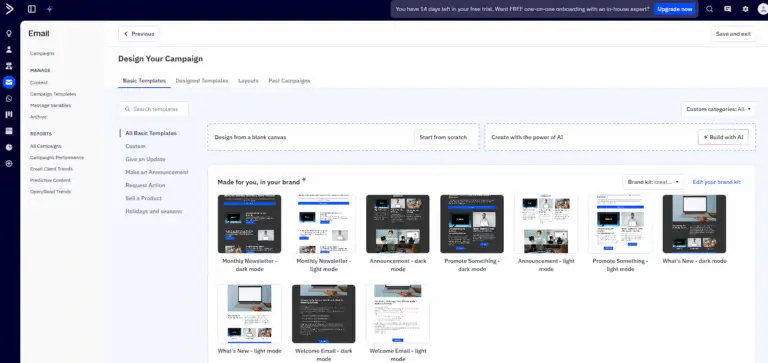
ActiveCampaign gives you several options when starting a new campaign. You can:
- Begin with a blank canvas
- Use one of their pre-designed templates
- Generate a template with AI
- Reuse one of your previous campaigns
- Send a plain-text email or an HTML email
The editor is intuitive, with drag-and-drop elements and flexible layout controls.
Brevo’s email builder
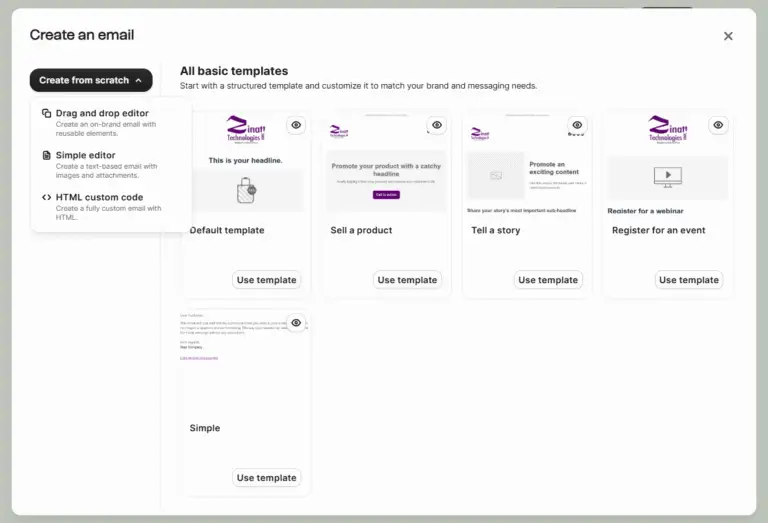
Brevo offers a very similar experience. You can:
- Choose from a library of pre-designed templates
- Build your email with the drag-and-drop editor
- Create or edit messages using custom HTML
- Reuse past designs from your template library
Both platforms cover all the essential design tools you’d expect.
Winner: It’s a draw
Email Editor
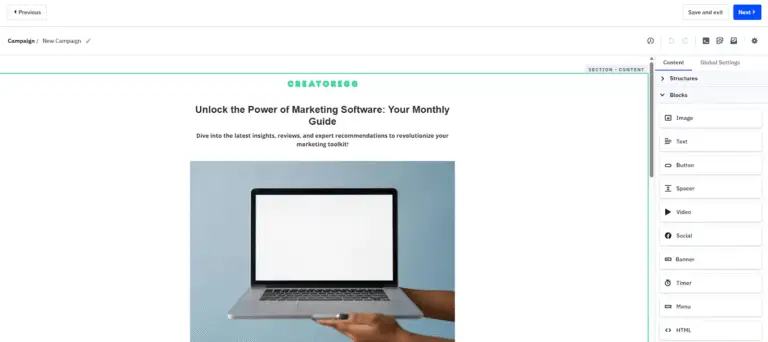
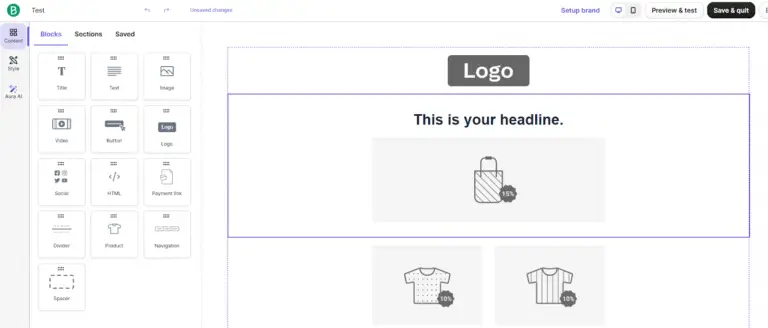
Below you can see screenshots of ActiveCampaign’s and Brevo’s email editors. Both offer extensive customization options and an easy-to-use interface. There’s really nothing to complain about on either side, and no meaningful difference that would justify choosing one tool over the other based on the editor alone.
ActiveCampaign’s email editor
Brevo’s email editor
Winner: It’s a draw
Email Scheduling
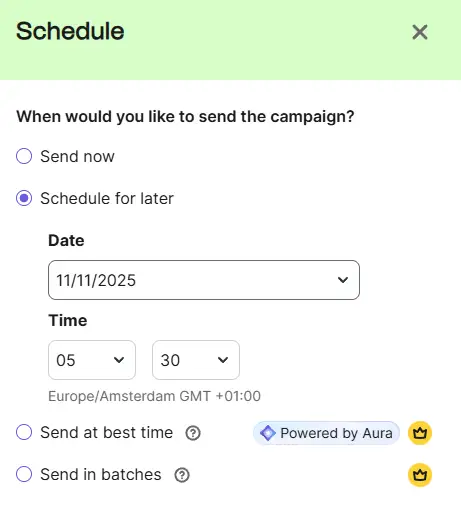
Brevo email scheduling
Brevo offers four scheduling options:
- Send now
- Schedule for later
- Send at best time (Brevo predicts the optimal time to send)
- Send in batches
The batch-sending option is especially useful for large lists. Instead of sending to your entire audience at once, Brevo can stagger delivery over several hours or days. This helps reduce sudden traffic spikes to your website, might improves deliverability, and allows you to catch any issues early.
ActiveCampaign email scheduling
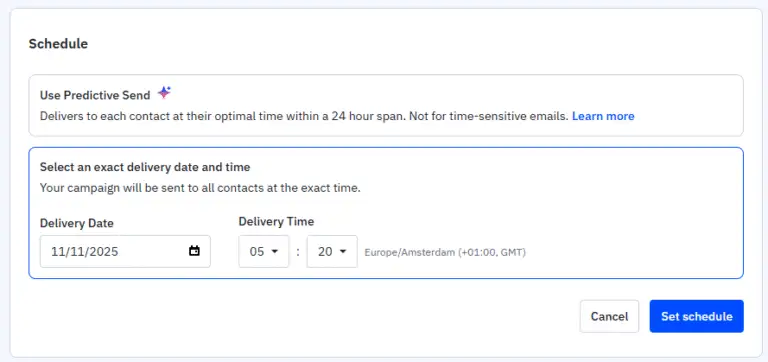
ActiveCampaign offers three scheduling options:
- Send immediately
- Schedule for later
- Predictive send (similar to Brevo’s “send at best time”)
The main difference is that ActiveCampaign does not include a batch-sending option, which is where Brevo has the advantage in this category.
Winner: Brevo
Remove Branding
Many email marketing tools include their logo or branding on newsletters or forms when you’re on a free or lower-tier paid plan. This usually appears as a small banner or a “Sent with…” message at the bottom of your emails, which does make your campaigns look less professional, in my opinion. Most platforms require you to upgrade or pay extra to remove it.
There’s no clear winner here because both Brevo and ActiveCampaign require an additional cost to remove their branding.
Remove branding in ActiveCampaign
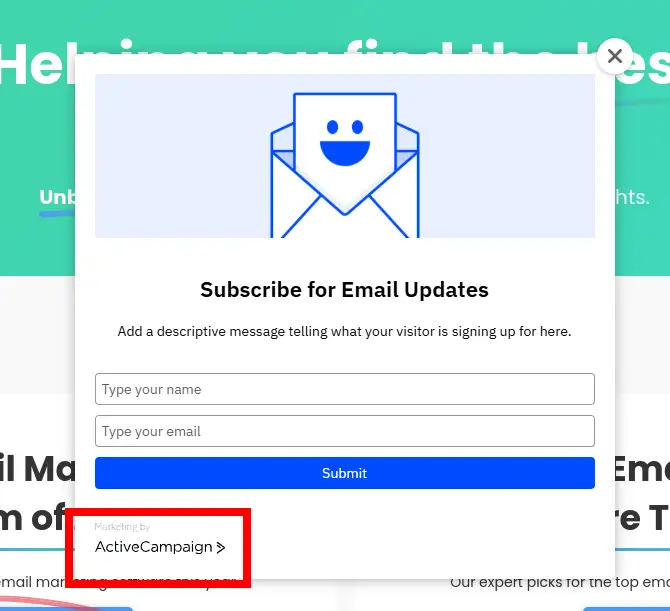
If you’re on the Starter plan (ActiveCampaign’s entry-level paid plan), the branding still appears but only on the opt-in forms you create with their form builder. To remove this, you need to upgrade to a higher-tier plan.
ActiveCampaign does not add branding to your actual emails, so if you’re using a separate form tool anyway, this may not affect you at all.
Remove branding in Brevo
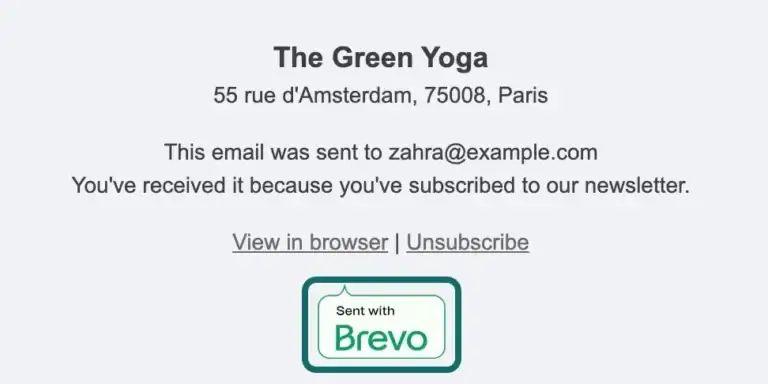
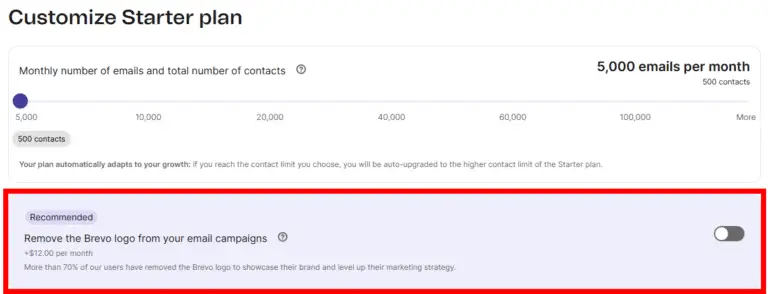
On the Starter plan, Brevo adds a small “Sent by Brevo” message at the bottom of your newsletters. To remove it, you need to add a $12/month branding-removal add-on. This option is only available on the Starter tier; higher tiers (like Standard) don’t include Brevo branding.
Conclusion
There’s no winner here because both tools require an additional cost to remove their branding. With ActiveCampaign, you must upgrade to a higher plan to remove branding from their opt-in forms. With Brevo, you can stay on the Starter plan but must pay an additional $12 per month to remove the “Sent by Brevo” footer from your emails.
Email Lists
Brevo
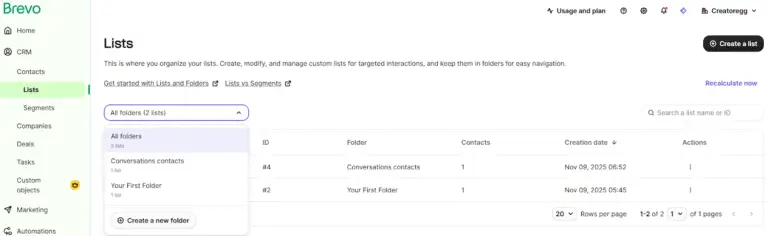
Brevo lets you create both folders and lists, which makes organizing your contacts very easy and clean.
- Folders allow you to group lists under a shared theme. For example, if you manage multiple brands, you can create a separate folder for each one, such as “The Green Yoga” or “Stretch & Yoga.”
- Inside each folder, you can then create lists. Lists act as subcategories for more specific segmentation. For example, under “The Green Yoga,” you could create a “Beginner Students” list, a “Intermediate Students” list, etc.
Brevo allows up to 300 folders and 300 lists per account, which is more than enough for most businesses.
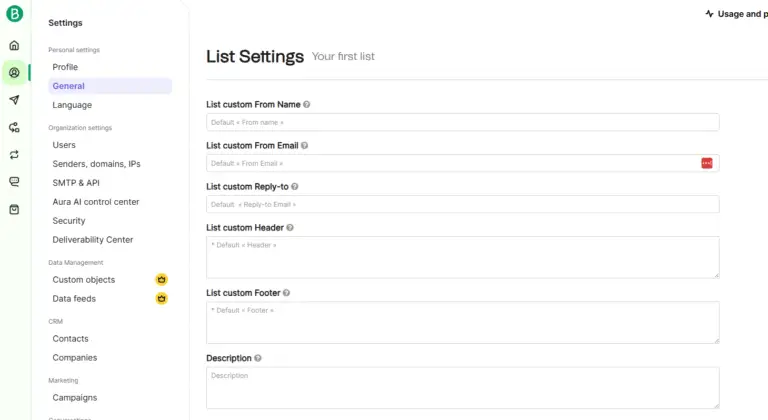
A standout advantage is that Brevo lets you customize details like the From name, From email address, and footer on a per-list level. This is extremely helpful if you run multiple brands or communicate with very different audiences. You can keep everything under one account without mixing up branding elements, reducing the chances of sending a newsletter from the wrong email address or with the wrong footer.
ActiveCampaign
ActiveCampaign also lets you create multiple email lists. On the Starter tier, you can create up to 5 lists. On the higher tiers, there’s no limit.
Unlike Brevo, ActiveCampaign does not offer folders to group lists together, though this is not a major drawback for most users.
However, ActiveCampaign does not allow you to change the default From name, From email address, or footer at the list level. This is a disadvantage if you want to use different sending identities for different audiences or brands, since everything shares the same default settings.
Winner: Brevo
Brevo vs ActiveCampaign: Email Marketing Automation
In the end, Brevo doesn’t surpass ActiveCampaign when it comes to automation power, flexibility, and the sheer range of options available. Still, Brevo’s automation features shouldn’t be dismissed. You may find they meet your needs perfectly. It’s worth testing both platforms to see which one fits your workflow.
Brevo offers a full free plan, while ActiveCampaign provides a 14-day free trial. Note: be sure to take advantage of my offers before signing up.
You’ll find all the details below. This section is organized into clear subsections, so you can easily jump to the parts most relevant to you.
- Limitations on Lower Tiers
- Automation Templates
- Organizing Your Automations
- Starting an automation
- Automation actions
Limitations on Lower Tiers
Both platforms offer email automation, but not every pricing tier includes full access to their more advanced automation features.
Brevo
Brevo has four paid plans: Starter, Standard, Professional, and Enterprise. The Starter plan caps you at 2,000 unique contacts moving through your automations. Once 2,000 people have entered any automation, the workflows stop running. This is a lifetime limit, not a monthly one, and the only way to remove it is by upgrading to the Standard plan or higher.
ActiveCampaign
ActiveCampaign also offers four paid plans. To unlock its core automation features, you need at least the Plus plan. For more advanced capabilities like A/B testing automated workflows and several additional tools, you must be on the Pro plan, which starts at $89 per month.
Conclusion
Brevo’s permanent 2,000-contact limit on the Starter plan isn’t exactly appealing, especially since it affects paying users indefinitely. A monthly cap would make more sense, but a fixed lifetime cap feels too restrictive.
Winner: ActiveCampaign
Automation Templates
Automation templates are pre-designed workflows that give you a starting framework you can tailor to your needs. They save time, reduce setup work, and help beginners get inspired without building everything from scratch.
ActiveCampaign
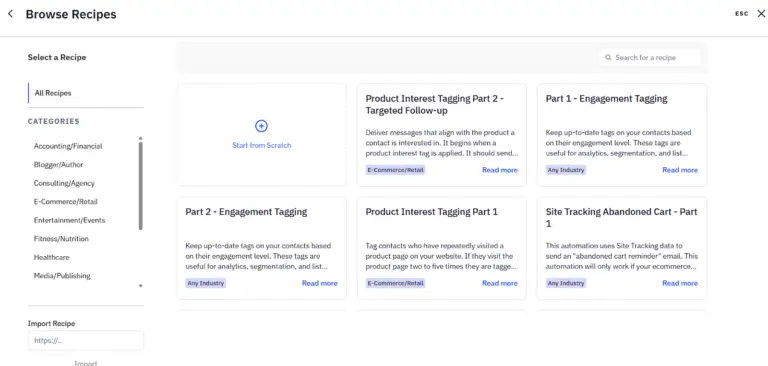
ActiveCampaign claims to offer nearly 1,000 automation templates, or “recipes.” In theory, this lets you plug a workflow into your account and start automating quickly. In practice, the sheer volume is overwhelming. There’s no simple way to figure out which of the hundreds of templates fits your situation, which makes the whole library feel more chaotic than helpful. Fortunately, you’re not required to use a template; you can always build from scratch, which is probably what most users end up doing anyway.
Brevo
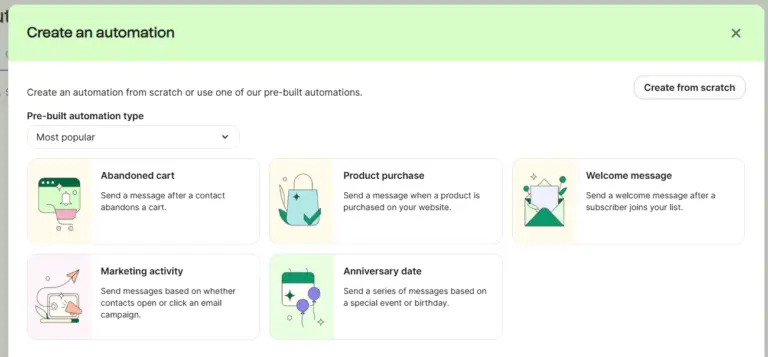
Brevo takes the opposite approach and offers just 8 automation templates. It’s far easier to navigate, and frankly, this is one of those cases where less really is more. For beginners, a small, curated selection does a better job of guiding them than a massive, confusing library. And just like with ActiveCampaign, you can build your own workflow from scratch if none of the templates suit your needs.
Winner: Brevo
Organizing Your Automations
If you run multiple automation workflows in your business, having tools to organize them becomes extremely helpful. With 10 or more automations, it’s practically essential, and once you’re managing 15 to 20+, proper organization tools are non-negotiable.
ActiveCampaign
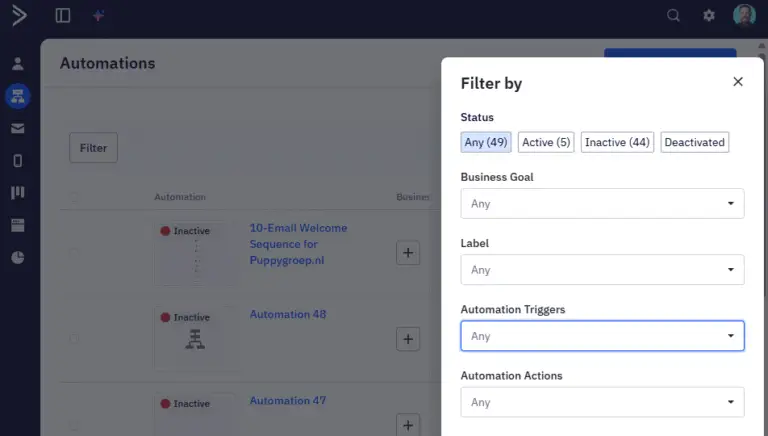
ActiveCampaign is one of the few email marketing platforms that offers strong features for organizing and filtering automations. You can add labels to each workflow and filter by those labels. You can also link automations to specific business goals you create inside ActiveCampaign. On top of that, it includes an Automation Map that visually displays all your workflows and how they connect, giving you a clear, high-level overview of your entire automation system.
Brevo
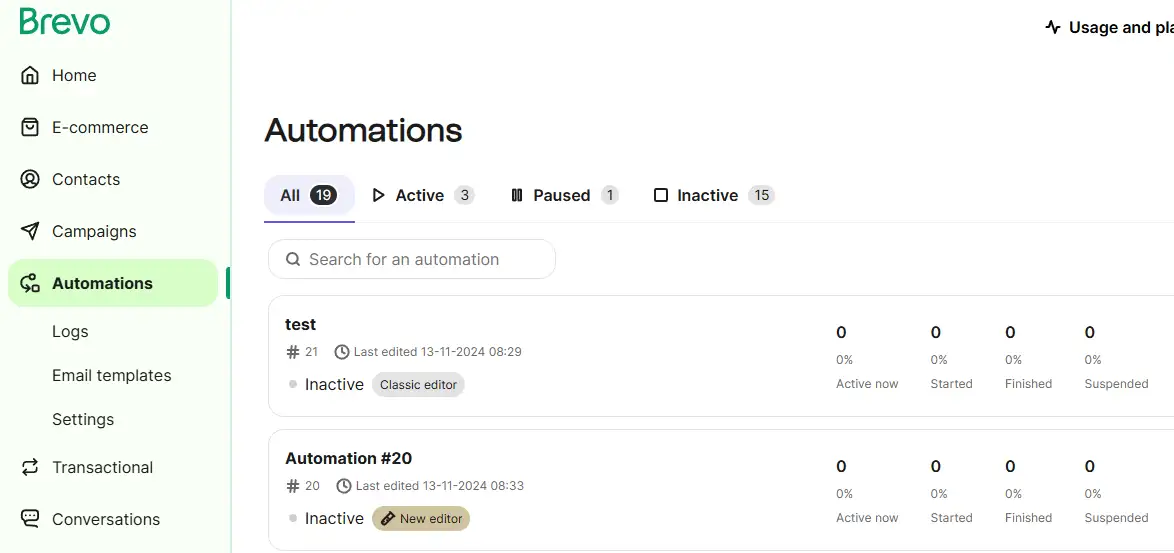
Brevo doesn’t offer anything comparable. You can only filter automations by status (Active or Paused), and that’s where the organizational options end. There are no additional features to group, categorize, or segment your workflows.
Conclusion
This section has an unmistakable winner. If you operate a large number of automations, advanced organization tools are crucial for staying in control.
Winner: ActiveCampaign
Starting an automation
To begin an automated workflow, the first step is setting a trigger. A trigger is the event that initiates the automation. This could be a new subscriber joining your email list, someone opening an email, clicking a link, making a purchase, or even reaching a specific date. A wide range of trigger options is useful because it allows you to precisely target your audience and make your automations responsive to their behavior.
Brevo
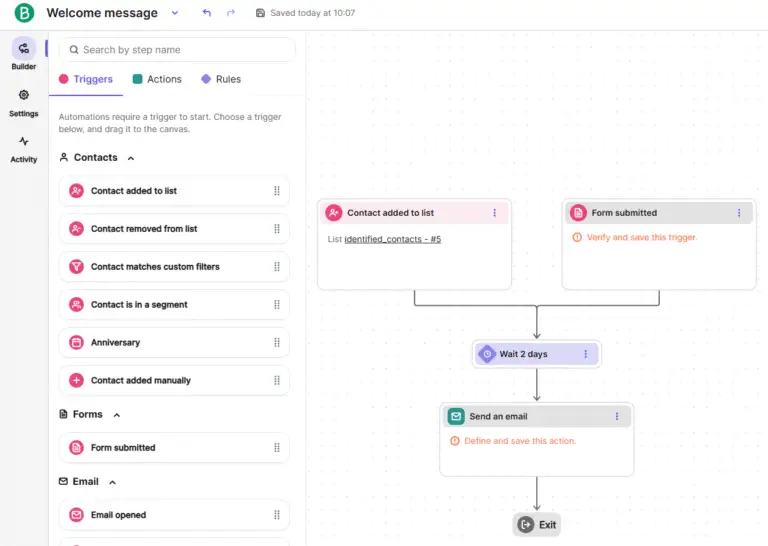
Brevo offers 22 different triggers to start an automated workflow. For example, you can start a workflow when someone joins a list, subscribes through a signup form, or when a contact attribute changes. You can also initiate a sequence in multiple ways. In the screenshot below, I added two triggers for this sequence: contact added to list and form submitted.
While it’s not visible in the screenshot, Brevo also provides CRM-related triggers because it includes CRM functionality. This means you can start an automation based on events such as deal created or deal stage updated, among others.
ActiveCampaign
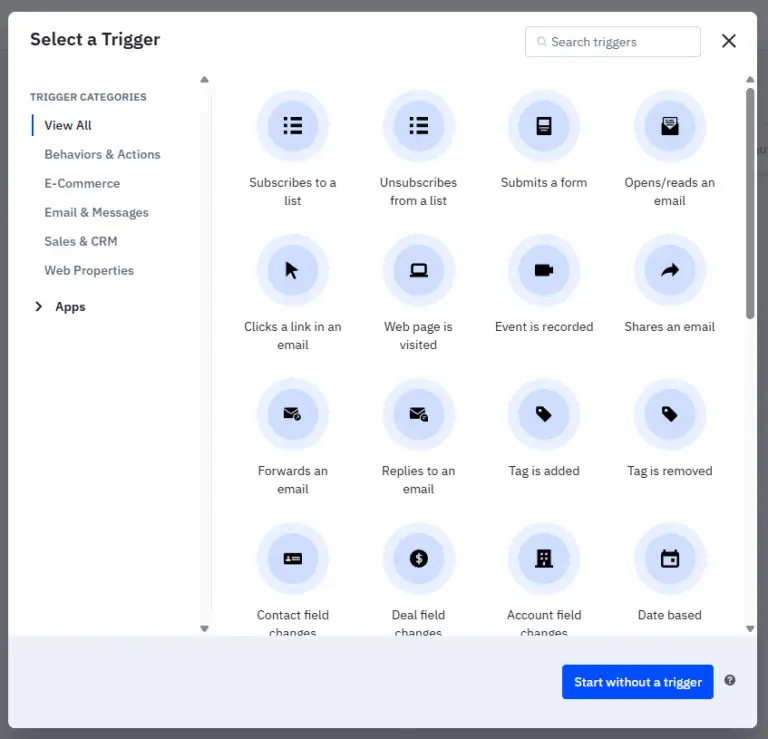
ActiveCampaign offers 34 different triggers to start an automation. Similar to Brevo, it also lets you start an automation without a trigger, which can be useful in certain situations.
Additionally, ActiveCampaign provides a wide range of integrations with other apps, allowing external events to trigger automated sequences.
Conclusion
ActiveCampaign offers greater flexibility and a larger variety of trigger options.
Winner: ActiveCampaign
Automation actions
Beyond triggers, automation workflows rely on automation actions. Steps like sending an email, adding a wait period, tagging a contact, updating a deal stage, and more. A diverse set of actions is just as important as having multiple triggers, especially if you want a flexible automation builder. With limited action options, you’re constrained in how complex or customized your workflows can be. A broad range of actions, on the other hand, allows you to build automations that more closely match your marketing strategy.
Brevo
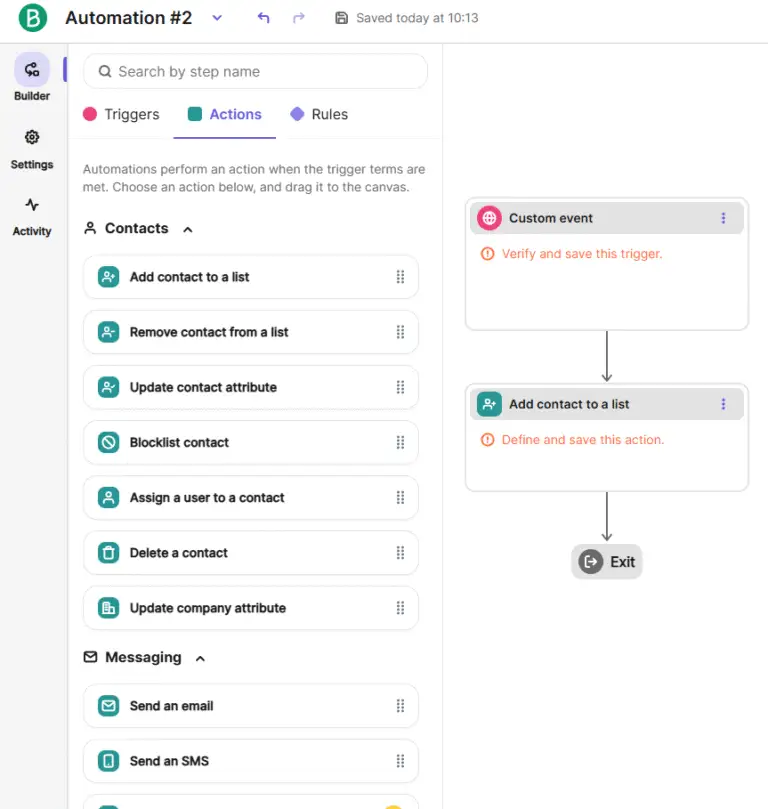
Brevo offers 18 different automation actions. The screenshot below shows a random selection, but the platform also includes actions tied to its CRM functionalities, useful if you’re using Brevo’s CRM tools as part of your workflow.
ActiveCampaign
ActiveCampaign provides 37 automation actions. More than double what Brevo offers. In addition, it includes actions that come from third-party integrations, giving you even more ways to build dynamic and personalized workflows.
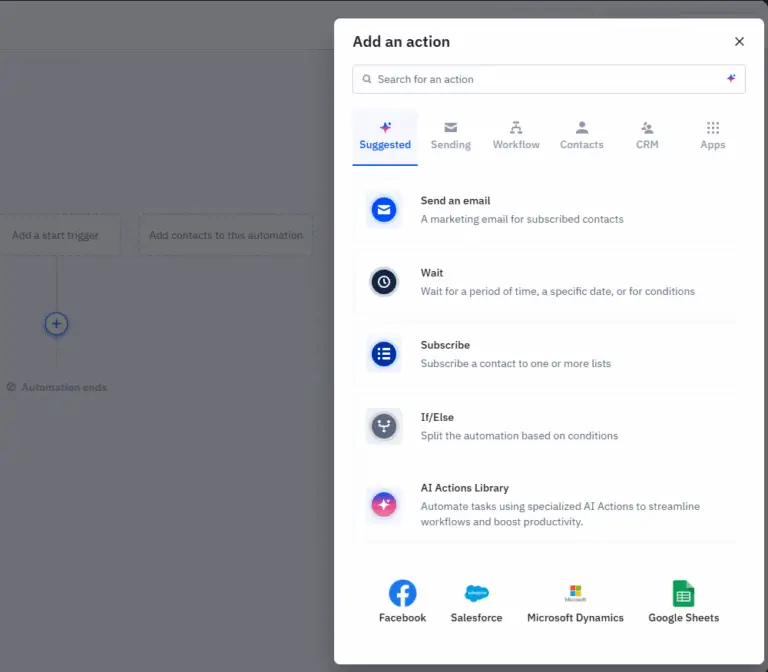
Conclusion
The winner here is clearly ActiveCampaign. With significantly more automation actions, it gives you far more flexibility in building sophisticated workflows. The wider the range of available actions, the more likely it is that whatever you imagine is actually possible to automate.
Winner: ActiveCampaign
Brevo vs ActiveCampaign: Opt-in Form Features
The opt-in form features are mixed, and there’s no single clear winner. In some areas ActiveCampaign leads; in others Brevo performs better. Your own needs will determine which platform feels stronger. For example, if you rely heavily on pop-ups, you’ll see in this section that ActiveCampaign falls short. Its embedded forms, however, work well. Brevo delivers far better pop-up functionality, but most of it sits behind a steep paywall.
You can review the detailed results below. The sections are organized so you can jump directly to what matters most to you.
- Form Design and Templates
- Embedded Form Functionalities
- Embed form builder
- Popup form functionalities
- GDPR and Privacy Functionalities
- Double-Opt-In Setup
Form Design and Templates
Neither Brevo nor ActiveCampaign offers pre-designed form templates. Both provide tools to customize your form’s appearance, but there’s no library of ready-made designs.
ActiveCampaign
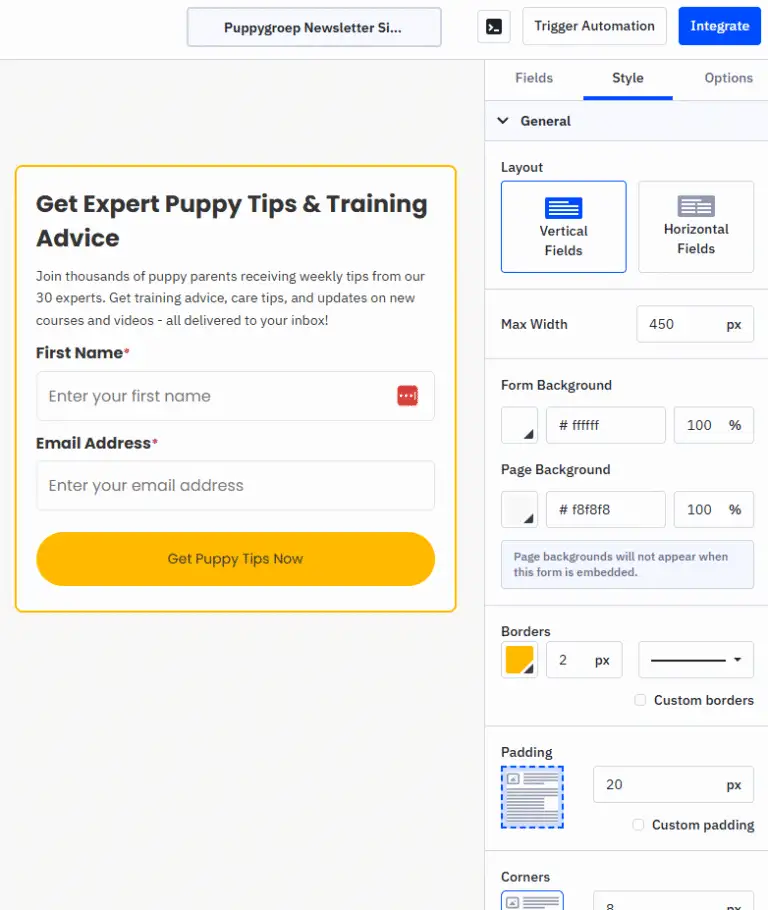
ActiveCampaign does not include pre-built templates, so you can’t choose from a set of preset designs. You either start from scratch or, preferably, use its AI tool to generate a form that matches your website’s look and feel. The example I created for my dog-training site came out well. After generation, you can further adjust layout, styling, and content in the form builder.
Brevo
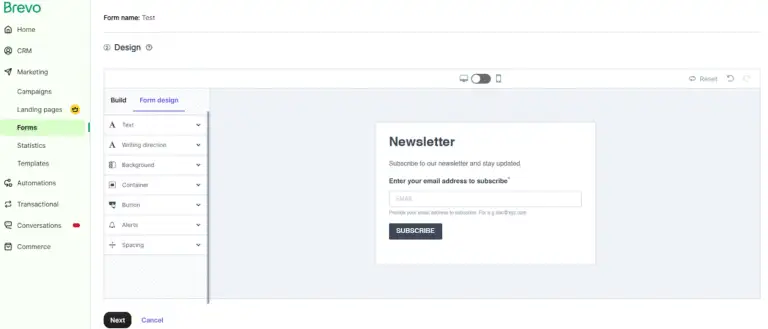
Brevo does not offer an AI-generated design option. All form customization is manual through its form builder. The builder works well, but the absence of an AI assistant means you lose the convenience and time savings ActiveCampaign provides. Still, it’s not a critical limitation if you’re comfortable designing forms yourself.
Winner: ActiveCampaign
Embedded Form Functionalities
This section looks only at whether Brevo and ActiveCampaign offer an embeddable form you can place on your website. The comparison is straightforward: do they provide an embed option or not?
ActiveCampaign
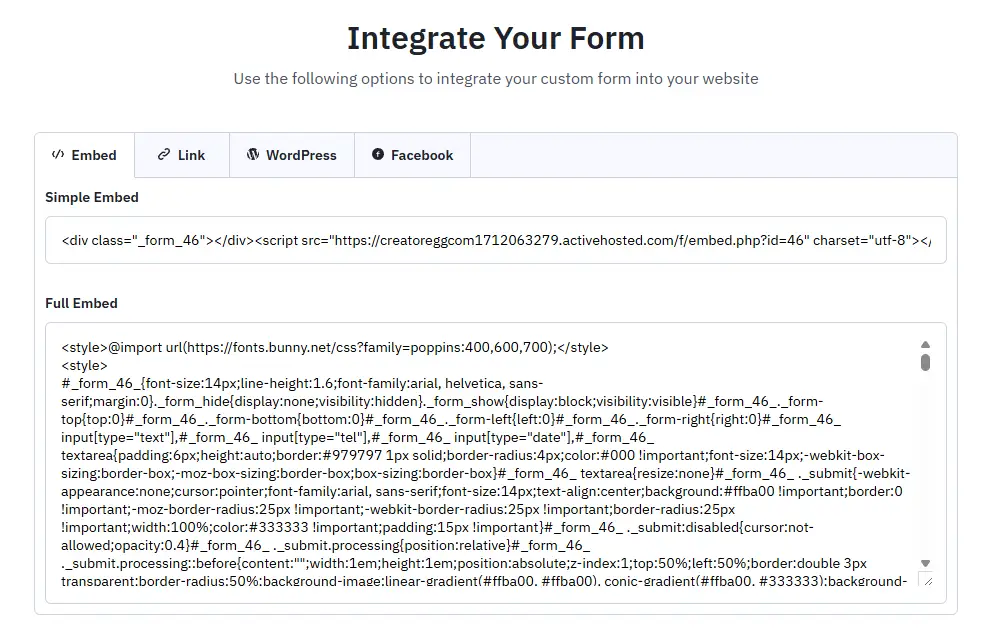
ActiveCampaign’s “inline form” (its version of an embedded form) is probably one of the most commonly used form types on the platform.
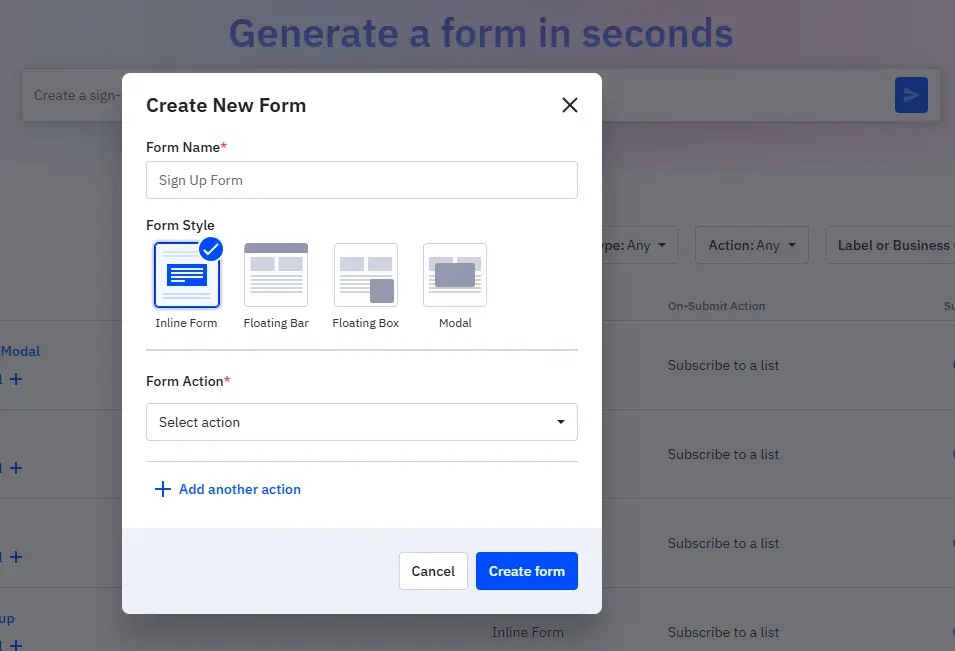
After you design your inline form, you can embed it on your site in several ways. You can also share it via a direct URL if you prefer not to embed it.
Brevo
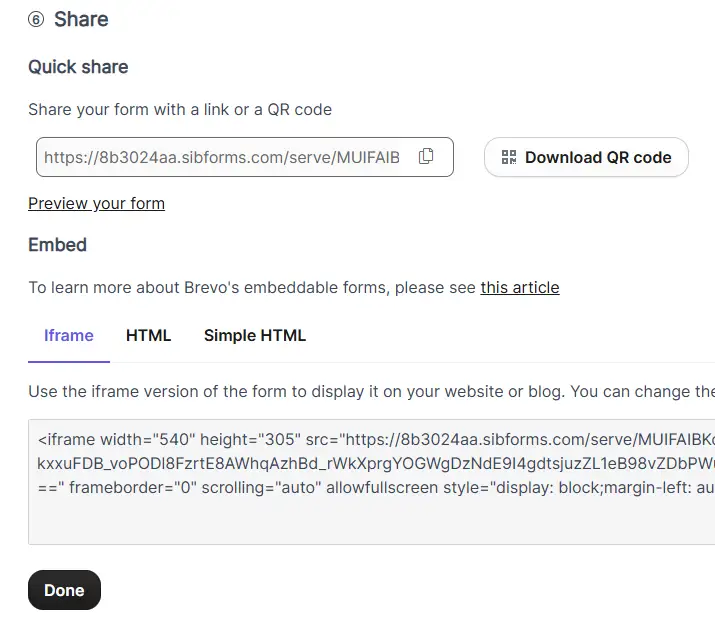
Brevo labels its embedded option as the “Full page/embedded” form. Once your form is designed, you can either share a direct link to its URL or embed it on your site.
Conclusion
Both platforms offer embedded forms, and the overall experience feels very similar. The options for sharing, whether via embed code or direct link, work almost the same.
Winner: It’s a draw
Embed form builder
ActiveCampaign
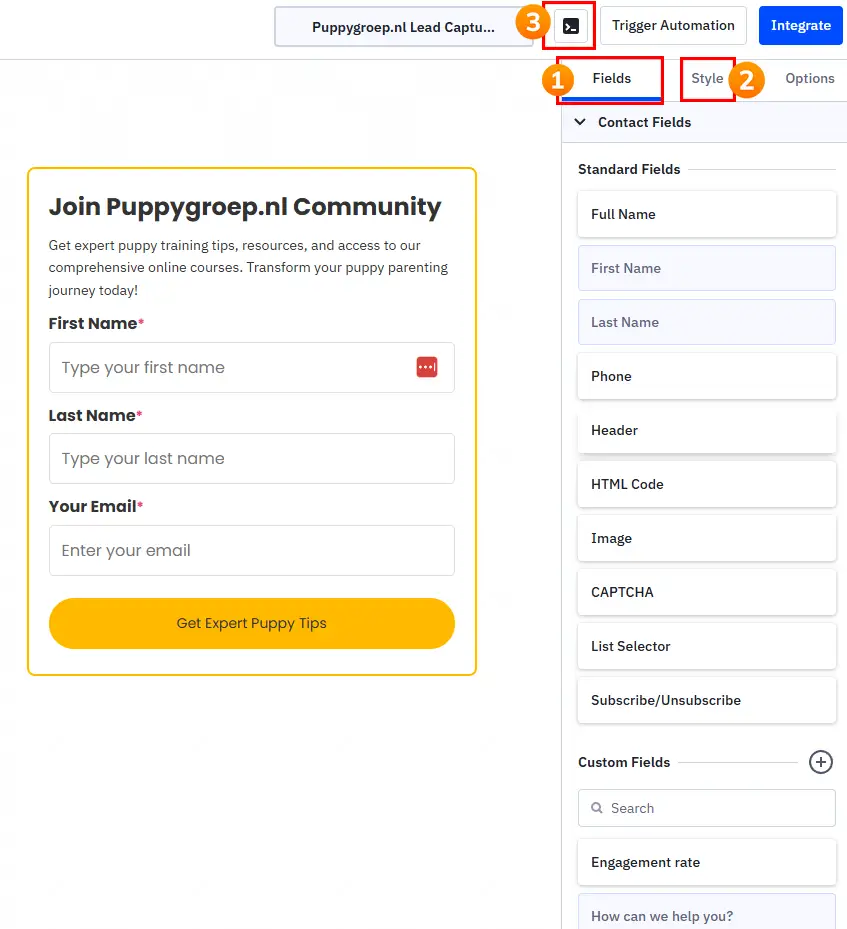
ActiveCampaign’s form builder is divided into two tabs: Fields and Style.
The Fields tab lets you add all the usual form elements: name, email, and so on, along with any custom fields you’ve created in your account. It also includes “Account” fields (not visible in the screenshot below), which are especially valuable for B2B-focused marketers.
The Style tab gives you control over the visual side of things, and you can add custom CSS for more advanced styling (see figure 3 in the screenshot).
Brevo
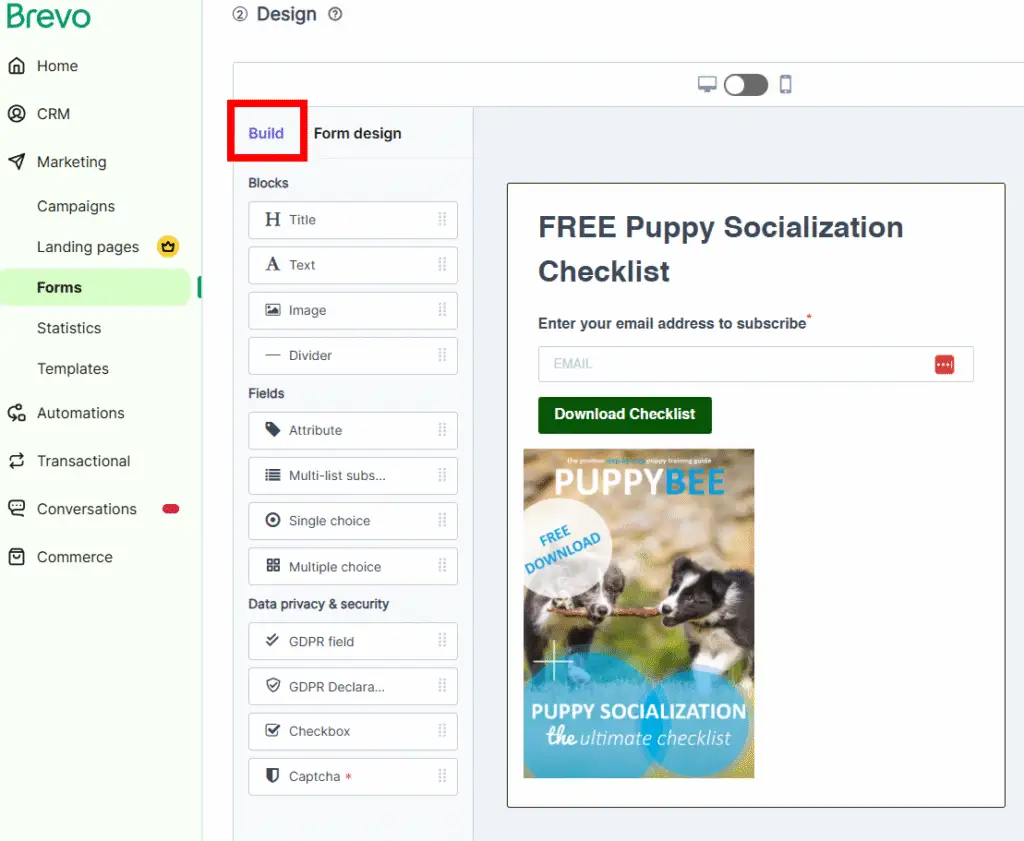
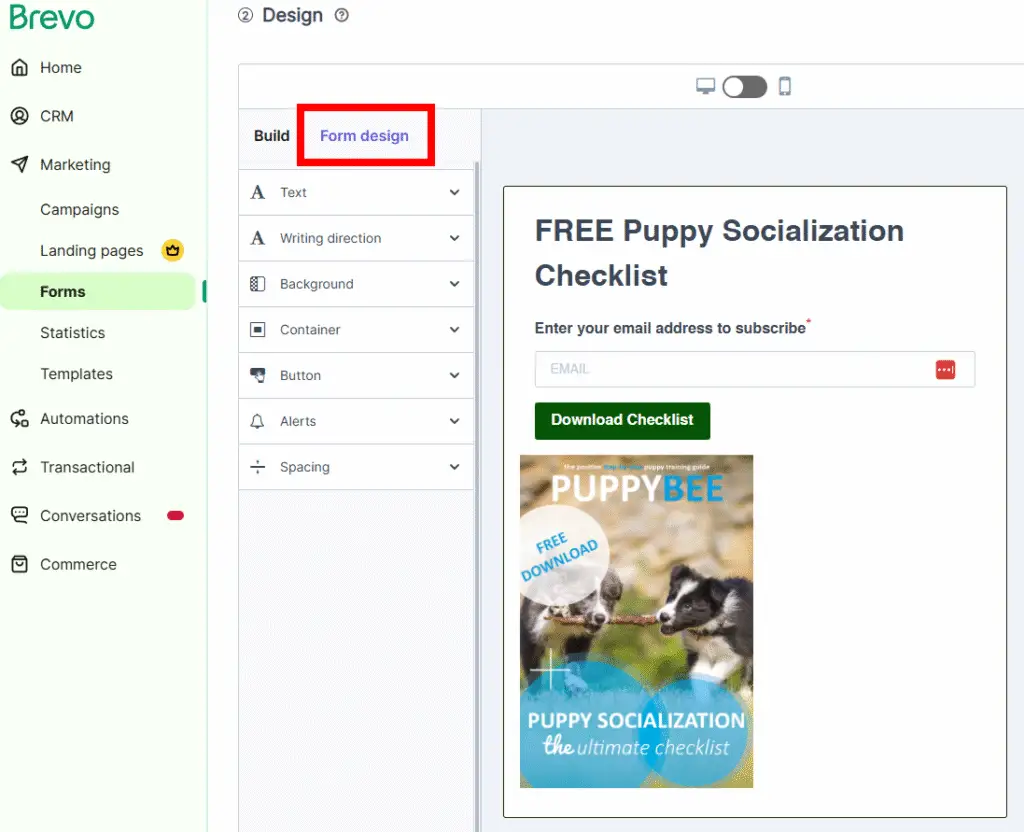
Brevo’s form builder is also split into two tabs. The Build section allows you to add elements, fields, and privacy components to your form. The Form design tab handles styling such as fonts, colors, and spacing. One limitation is that Brevo doesn’t support custom CSS for additional design tweaks.
Conclusion
ActiveCampaign’s form builder comes out ahead with its richer options: hidden fields, account fields, and custom CSS. As always, it’s worth experimenting with both builders to see which one fits your workflow.
Winner: ActiveCampaign
Popup form functionalities
Brevo
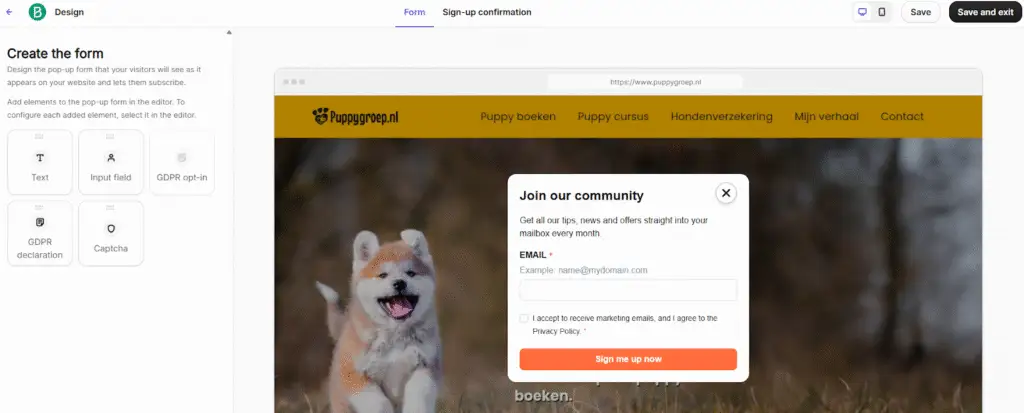
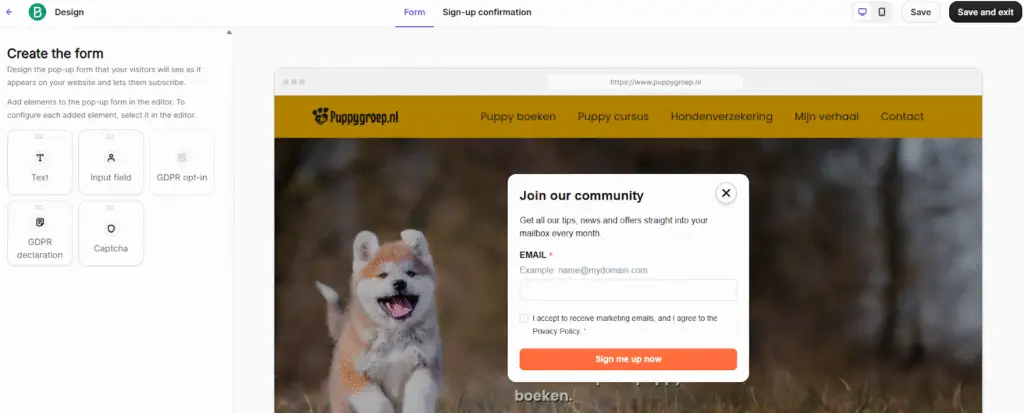
Brevo offers two form types: the embedded form (covered earlier, similar to ActiveCampaign’s inline form) and the popup form. The popup feature works well, but there’s a major drawback: it’s only available on the Professional tier. Starter and Standard users don’t have access, which means the price jumps quickly if you want popups.
In the screenshot, you can see Brevo’s popup customization panel. It includes everything you’d typically expect from a popup builder. One common use case is setting a delay, such as showing the popup after 5 seconds. Brevo also supports exit-intent (triggered when the visitor is about to leave your site).
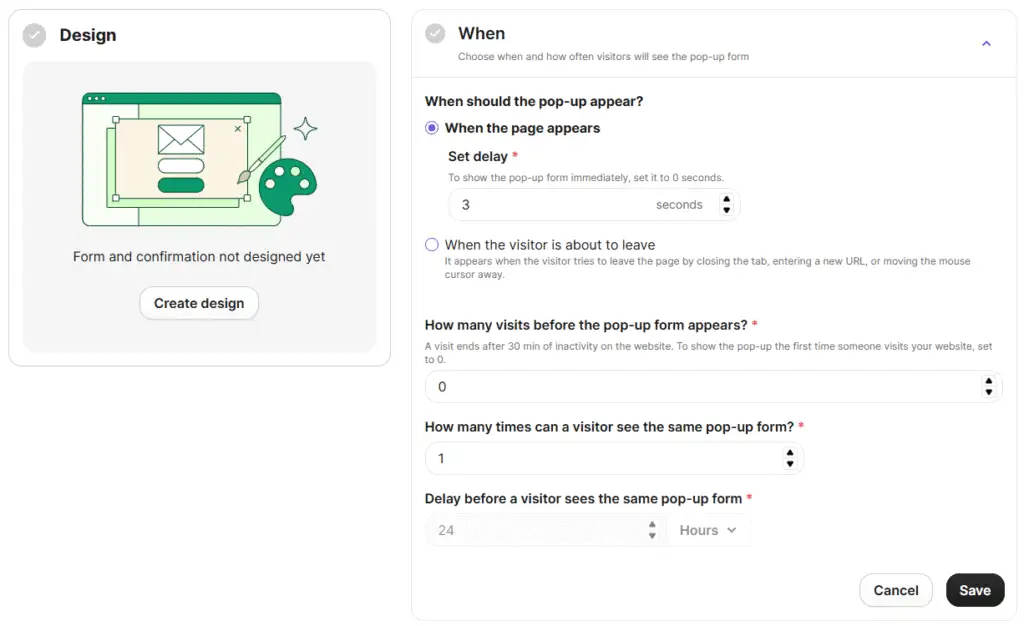
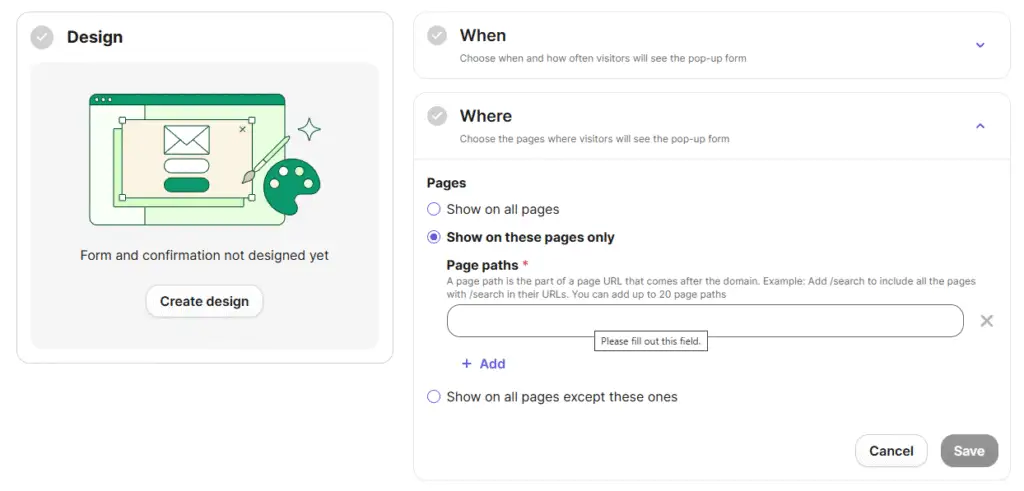
You can also exclude specific pages from displaying the popup.
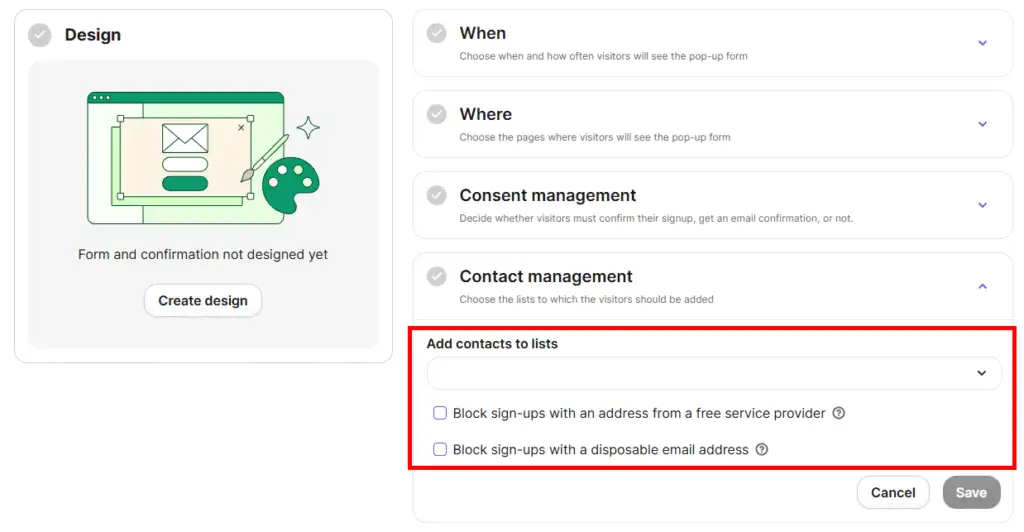
There’s also a clever business-focused feature: you can restrict sign-ups to business email addresses only.
The design tab works smoothly as well. You can add or adjust elements and tweak the layout without friction.
ActiveCampaign
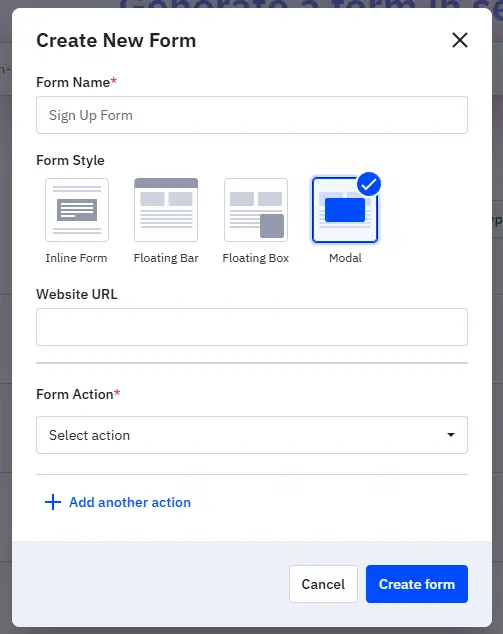
ActiveCampaign handles popups a bit differently. It offers four form types: Inline, Floating Box, Modal Pop-up, and Floating Bar.
If you want the popup, the Modal form is the one you’ll use.
One thing to note is that ActiveCampaign’s inline form includes an AI design builder, but the modal popup doesn’t. If you design a form with the AI builder, the system only creates an inline version. For the modal popup, you’ll need to design it manually using the available settings.
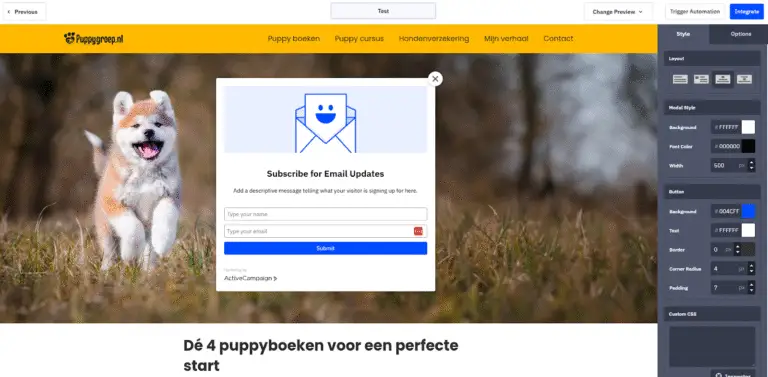
The bigger limitation is the lack of advanced popup behavior. ActiveCampaign only supports two display triggers: show instantly, or show after a scroll delay. There’s no option for time-based delays (e.g., after 5 seconds) or exit-intent triggers, two of the most commonly used popup behaviors.
Conclusion
Brevo clearly wins in terms of popup functionality. The catch is that the feature is locked behind the higher-priced Professional tier, which may be frustrating for many users. Price aside, Brevo’s popup toolset is stronger and more flexible.
Winner: Brevo
GDPR and Privacy Functionalities
Depending on your industry, the country you operate in, and where your audience is located, privacy features may matter more to some businesses than others. GDPR and privacy features help you gather verifiable consent from new subscribers so you can email them legally. This is especially important in Europe, where GDPR regulations are stricter than in many other regions.
ActiveCampaign
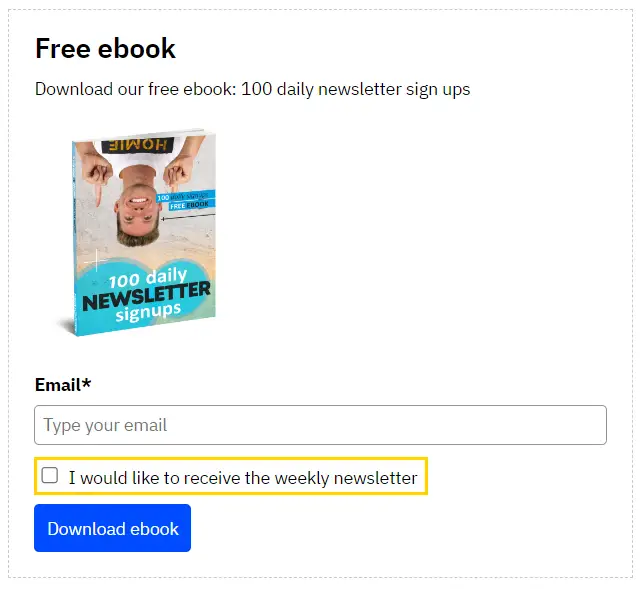
ActiveCampaign provides tools for capturing subscriber consent. See the example in the screenshot below.
Brevo
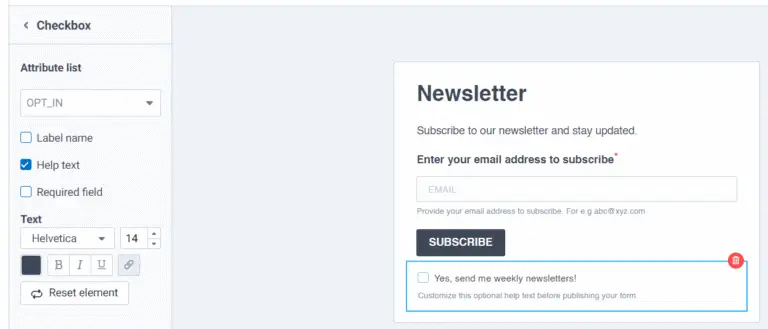
Brevo also allows you to add consent fields to your forms, giving you documented proof of GDPR-compliant permission. You can see an example in the screenshot below.
Conclusion
Both platforms offer solid privacy and consent-collection capabilities. Brevo is based in the EU, so it may place stronger emphasis on GDPR compliance, though I haven’t tested additional use cases beyond the examples shown here. If you have a specific scenario in mind, it’s worth testing both platforms before committing to a long-term plan. Also consider checking out my limited-time offers for both tools before signing up for a trial or a paid subscription.
Winner: It’s a draw
Double-Opt-In Setup
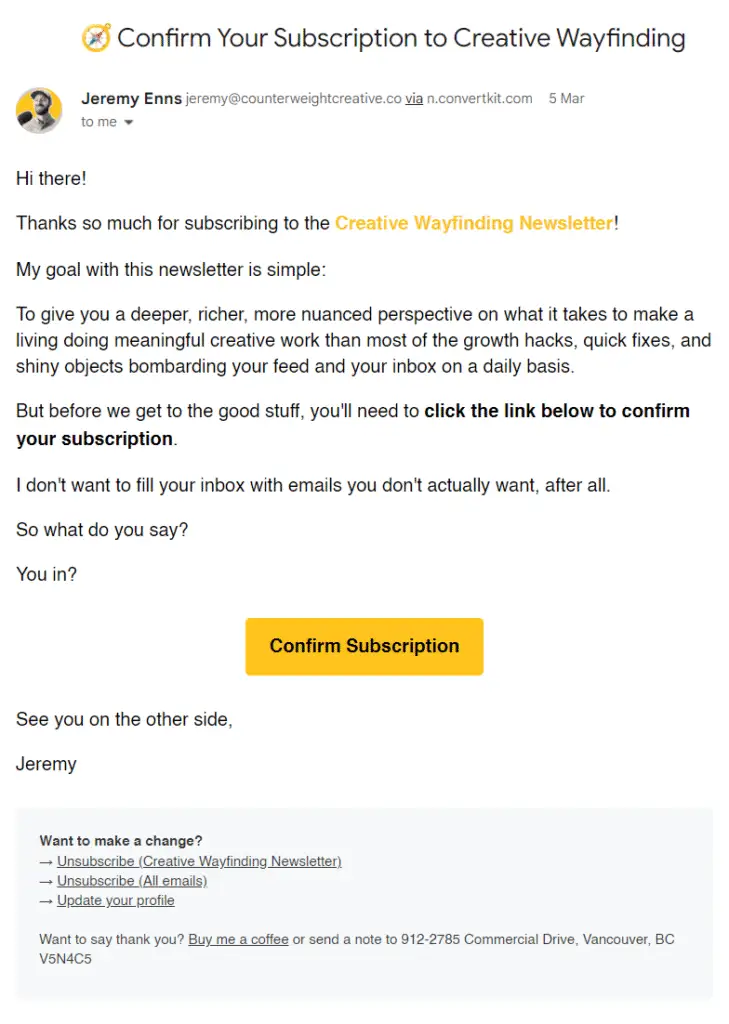
When you subscribe to a newsletter, you’ll often receive a confirmation email, an extra verification step known as double opt-in. The screenshot below shows an example from the Creative Wayfinding Newsletter.
Brevo Double-Opt-In Setup
Every email marketing tool handles double opt-in a bit differently, but Brevo’s process is unusually cumbersome. You first have to create the confirmation email, but only after creating its template in a separate window, remembering the exact template name, and adding the required “optin” tag. Without that tag, the email won’t appear in the dropdown menu, a detail Brevo never clearly explains (I only learned it through support).
After that, you choose the confirmation page subscribers will see. Brevo doesn’t let you build a custom thank-you page directly inside the form builder, so you’ll need to create one elsewhere. You can assign a custom link to the “Confirm My Subscription” button, but you can’t link directly to a file (like a Google Drive download). Instead, you must create a webpage and place the file link there.
Finally, if you want to send a welcome or confirmation email after verification, you need to create yet another separate template before selecting it.
Brevo fully supports double opt-in, but the setup involves more steps than most competing platforms and feels less intuitive overall.
ActiveCampaign Double-Opt-In Setup
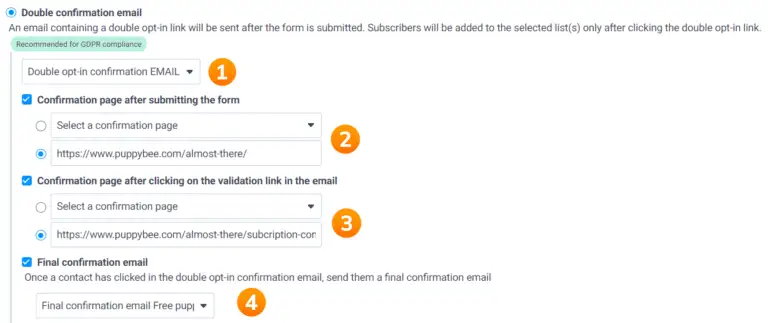
ActiveCampaign also offers built-in support for double opt-in. When creating a form, you can simply choose between single opt-in and double opt-in. If you enable double opt-in, ActiveCampaign automatically sends a confirmation email to anyone who submits the form, requiring them to click a verification link before becoming an active subscriber. It’s recommended for GDPR compliance and overall list hygiene, and ActiveCampaign makes it painless to activate.
You can also customize both the confirmation email and the thank-you page. I’ve done this myself to maintain consistent branding, for example, swapping out the generic “Please confirm your subscription” text with my own wording and visuals.
For a step-by-step walkthrough, you can check out my ActiveCampaign Tutorial at the 1:31:00 timestamp, where I explain GDPR-compliant signup forms and show how to set everything up:
Conclusion
ActiveCampaign’s setup process is much easier and more streamlined than Brevo’s. Still, it’s worth testing both platforms yourself to see which one fits your workflow best. If you decide to sign up for either tool, make sure to use my link so you can receive the free bonuses I offer (more details available on my site).
Winner: ActiveCampaign
Take advantage of these limited-time offers!
- Brevo: Get 50% off for the first three months! Sign up using my link and enter the code Creatoregg at checkout. Offer valid until [wpcode id=”5614″].
- ActiveCampaign: Receive 6 months of free, personalized email support from me when you sign up using my link. I’ll guide you through setup, optimization, and answer your questions to ensure your success with the platform. Offer valid until [wpcode id=”5614″].
Brevo vs ActiveCampaign: CRM & Sales Features
This is a key section if you’re comparing Brevo and ActiveCampaign for their CRM capabilities, one of the main reasons people choose either platform. So, who’s the winner?
When it comes to flexibility and automation, ActiveCampaign edges ahead, as you’ll see in the details below. However, across many of the CRM and sales features I compared, the result is essentially a tie, meaning Brevo can handle most of the same tasks just as well. That’s a strong point in Brevo’s favor, especially since it’s the more affordable option.
You’ll find the full breakdown below. I’ve organized the content into clear sections so you can jump directly to what matters most to you.
- Demo Videos
- Pricing Explanation
- Limitations on lower tiers
- Pipeline
- Deals
- Sales automation
- Task management
- Conclusion
Demo Videos
Brevo
In the video below, I walk through Brevo’s CRM features:
ActiveCampaign
In this video, I demo ActiveCampaign’s CRM features:
Pricing Explanation
Brevo Pricing
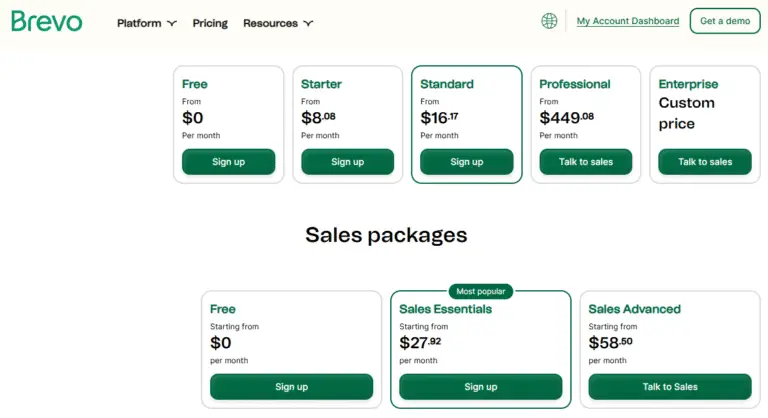
Beyond the standard Email Marketing pricing tiers shown on Brevo’s website, the platform also offers separate “Sales Packages”:
- Free
- Sales Essentials
- Sales Advanced
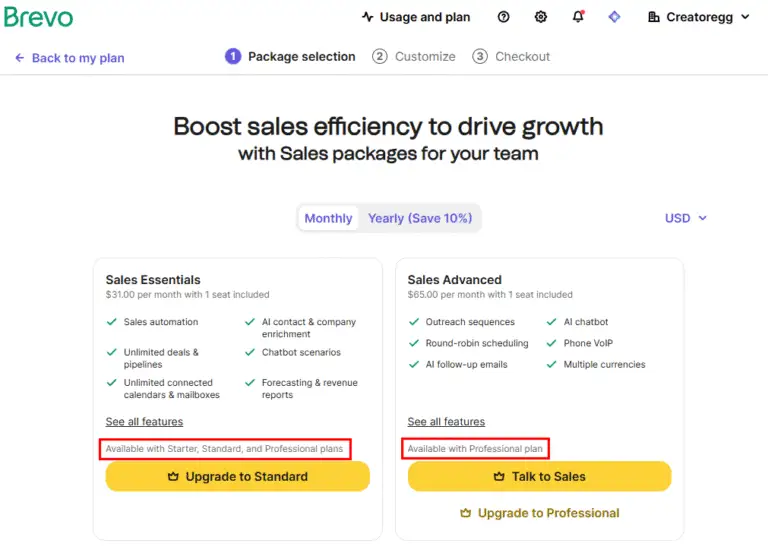
When you sign up for Brevo’s Free plan, you automatically get access to the free tier of the CRM and sales features. To unlock the Sales Essentials tier, you must subscribe to the Email Marketing Starter plan. To access Sales Advanced, you need to be on the Professional plan.
It’s important to note that while Email Marketing plan prices increase as your monthly email volume grows, the prices of the Sales Packages remain fixed. Even if you end up paying $500 per month for a high-volume Email Marketing plan, Sales Essentials still costs the same $27.
ActiveCampaign Pricing
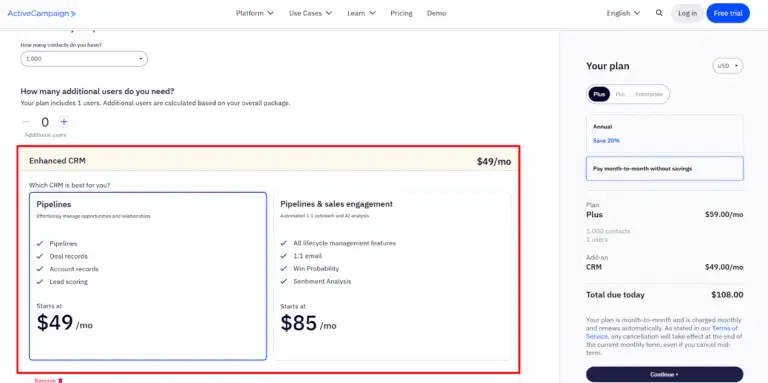
ActiveCampaign’s structure is similar. You can add its CRM and sales functionality as an add-on to any Email Marketing plan. The cost of the CRM & Sales add-on does not change based on your subscriber count. However, the price does increase when you upgrade from Plus to Pro or Enterprise.
Conclusion
Based strictly on pricing, Brevo comes out ahead. It offers a free plan for both Email Marketing and Sales Packages, its paid Sales tiers are cheaper, and their prices don’t rise when you upgrade your main plan. ActiveCampaign, by contrast, increases the cost of its CRM & Sales features when you switch to a higher-tier plan and is generally more expensive overall.
Winner: Brevo
Limitations on lower tiers
Brevo
Brevo’s free plan is generous, giving you unlimited time to explore its features and decide whether the platform suits you. The Sales Essentials plan unlocks most sales features, but several capabilities remain exclusive to the Advanced tier. The frustrating part is that the Advanced tier is only available if you’re on the Professional email marketing plan. That requirement feels odd, because the Professional plan is meant for users sending 150,000 emails or more each month. It creates an unnecessary barrier for businesses that want advanced sales features without needing high-volume email sending.
ActiveCampaign
ActiveCampaign’s Starter tier doesn’t include access to its CRM and sales add-ons. To use those, you need to sign up for at least the Plus tier.
Conclusion
Although I’ve labeled this comparison a draw, I was slightly inclined to give ActiveCampaign the edge. Brevo’s decision to lock its advanced sales tier behind the Professional email marketing plan feels like a misstep. Then again, ActiveCampaign also restricts its CRM and sales features to higher tiers, so neither platform escapes this drawback.
Winner: It’s a draw
Pipeline
Brevo
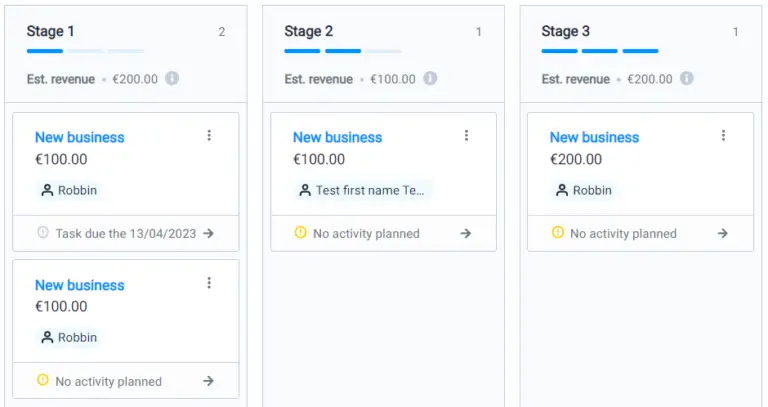
The image below shows Brevo’s pipeline feature.
ActiveCampaign
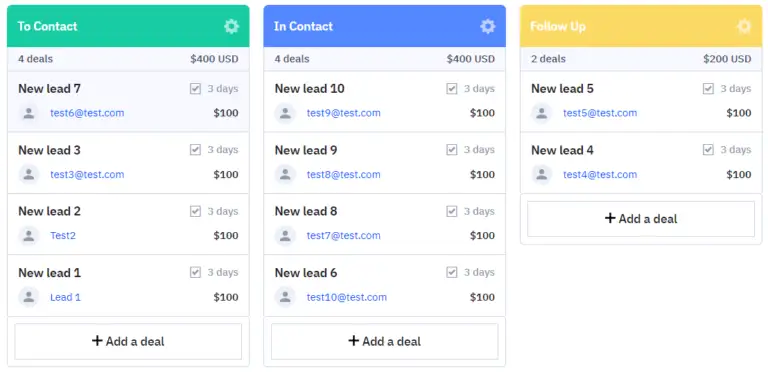
The image below shows ActiveCampaign’s pipeline feature.
Conclusion
Both Brevo and ActiveCampaign let you build and customize a sales pipeline. After testing them side by side, I didn’t find any meaningful differences in how they work. This is especially good news for Brevo, since it provides comparable functionality at a lower price. Both platforms let you add new pipeline stages, rename them, or remove them entirely.
Winner: It’s a draw
Deals
Brevo
The screenshot below shows how adding a new deal to your Brevo pipeline works.
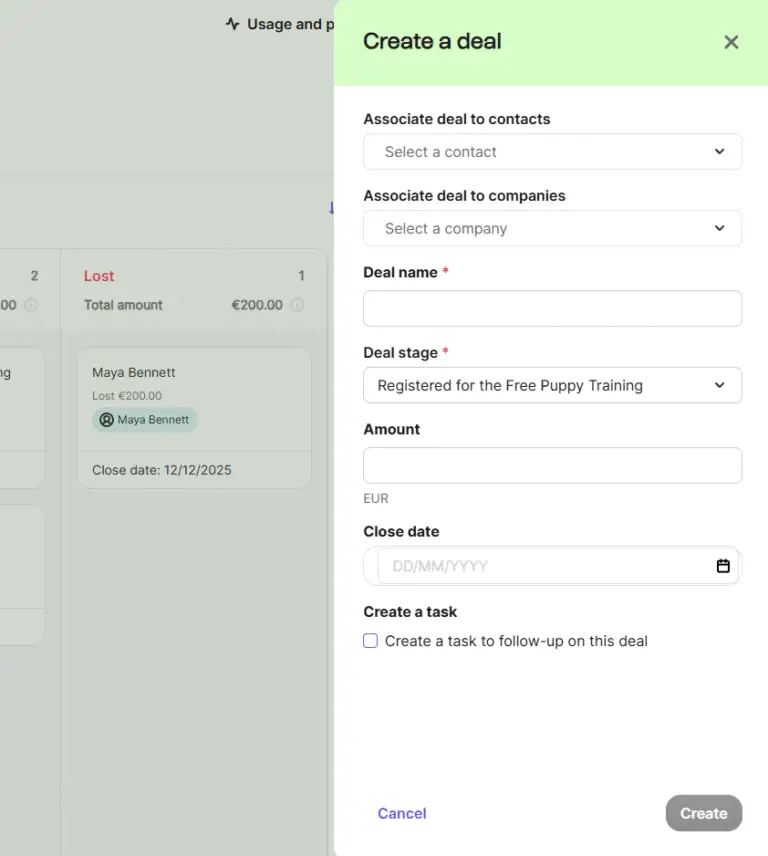
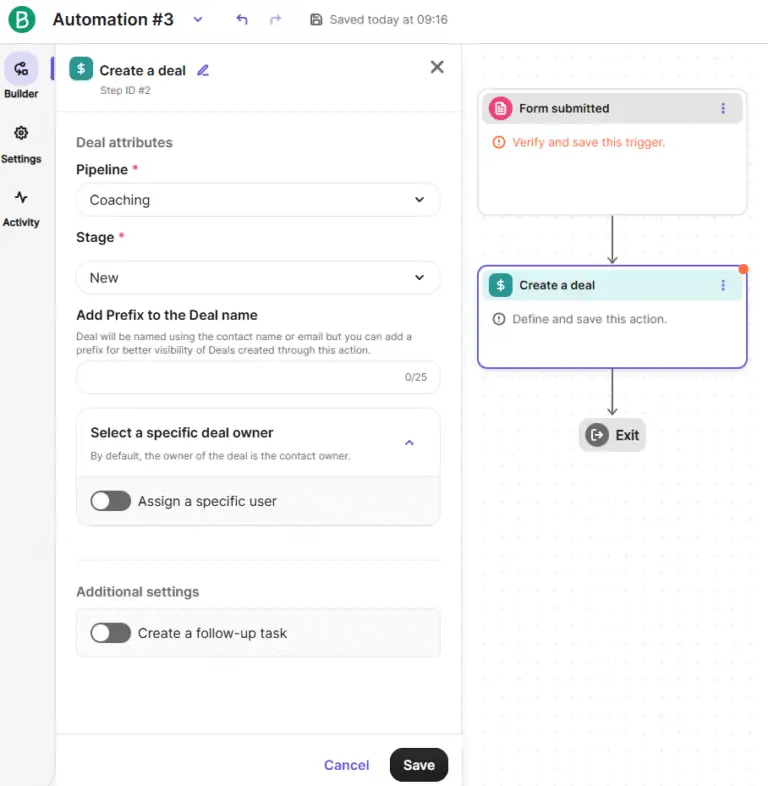
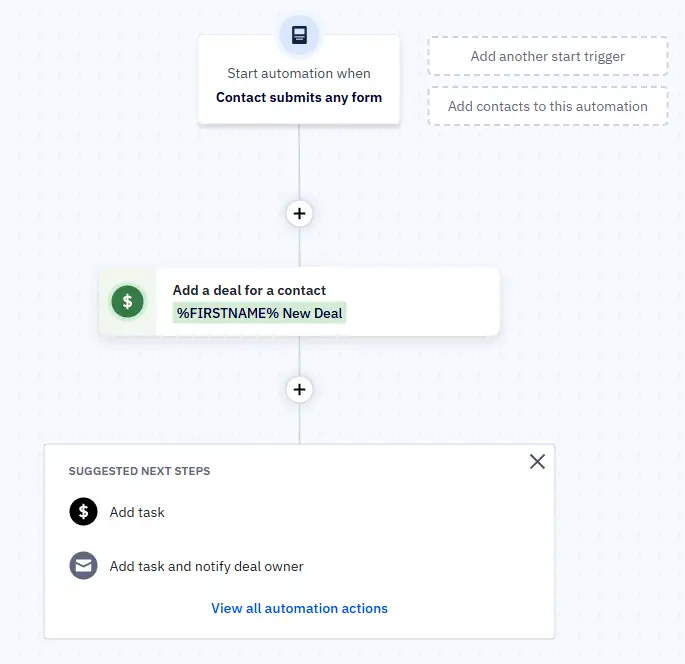
Of course, manually creating deals isn’t ideal. Automation becomes essential when someone signs up for your software, requests details about a property, or asks for more information about a course you’re selling. Brevo supports automated deal creation as well, such as generating a new deal whenever a form is submitted.
ActiveCampaign
The screenshot below shows how adding a new deal manually works in ActiveCampaign.
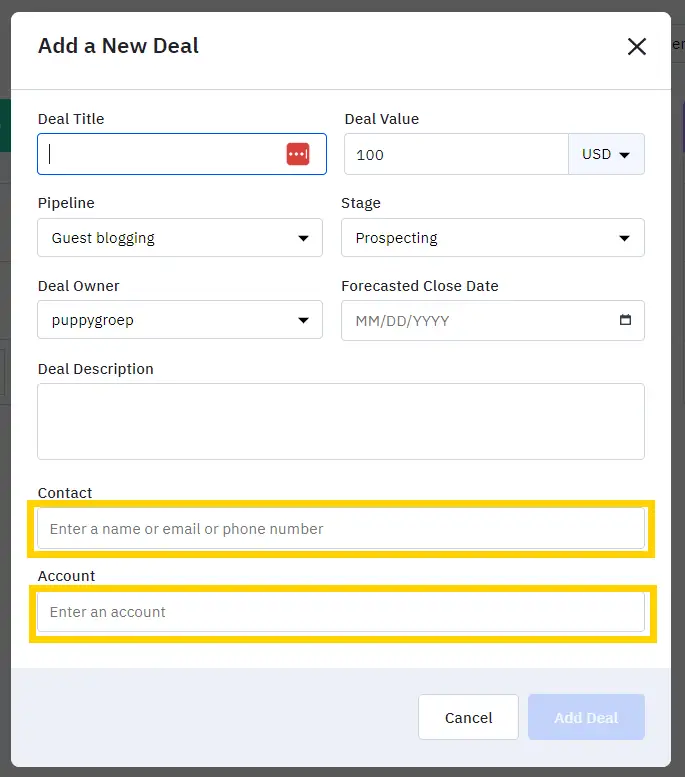
Just like with Brevo, you’ll rarely want to create deals by hand. Automated deal creation is extremely useful for new signups, information requests, and other lead-capturing events, and ActiveCampaign also supports creating deals automatically through various triggers.
Conclusion
Both platforms offer a similar experience when it comes to working with deals and adding them manually. They also allow you to automatically create new deals based on a wide range of triggers, including form submissions.
My early impressions are that Brevo is just as capable in this area as the more expensive ActiveCampaign, which is great news for Brevo users (though less exciting for ActiveCampaign’s value proposition).
Winner: It’s a draw
Sales automation
ActiveCampaign sales automation functionalities
ActiveCampaign provides a strong set of CRM and sales-related automation tools.
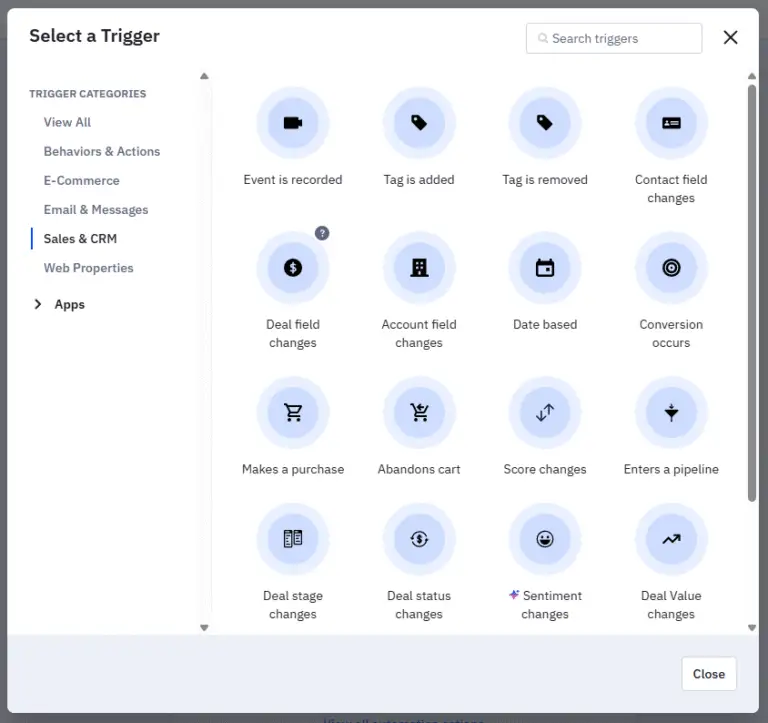
To start, it offers 20 sales/CRM-related triggers you can use to kick off an automated workflow. The screenshot below shows part of that list.
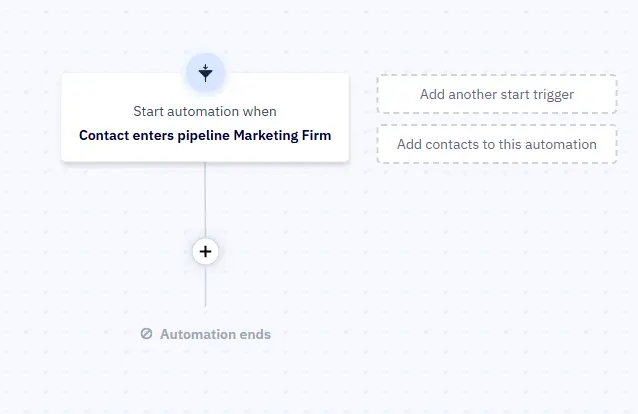
You can see in the next screenshot an example where “Contact enters a pipeline” is used as the trigger for the workflow I’m building.
Triggers are only half the story. You also need actions: what should happen after a contact enters the pipeline? ActiveCampaign gives you 15 CRM and sales-related actions to choose from. A portion of these actions is shown in the screenshot below.
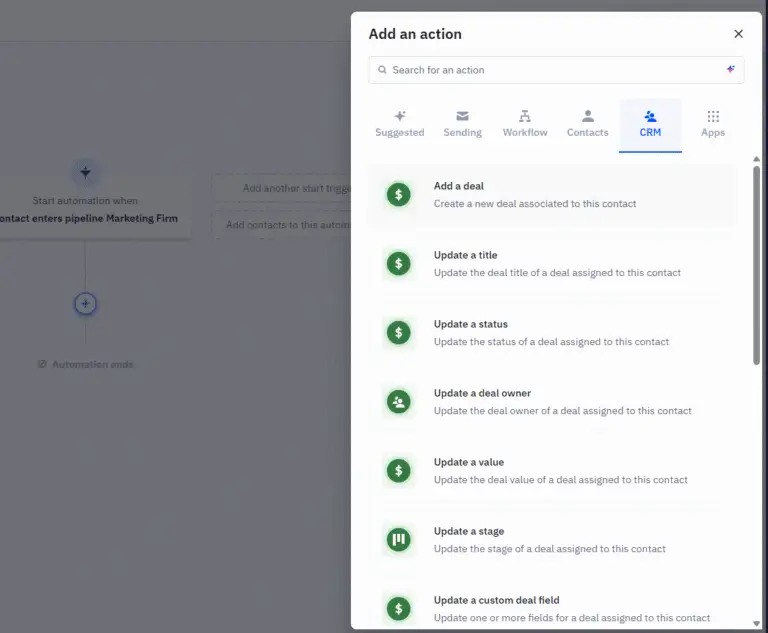
Together, these triggers and actions give marketers a wide creative runway for building complex sales automations.
Brevo sales automation functionalities
Brevo offers 9 CRM and sales-related triggers, shown in the screenshot below.
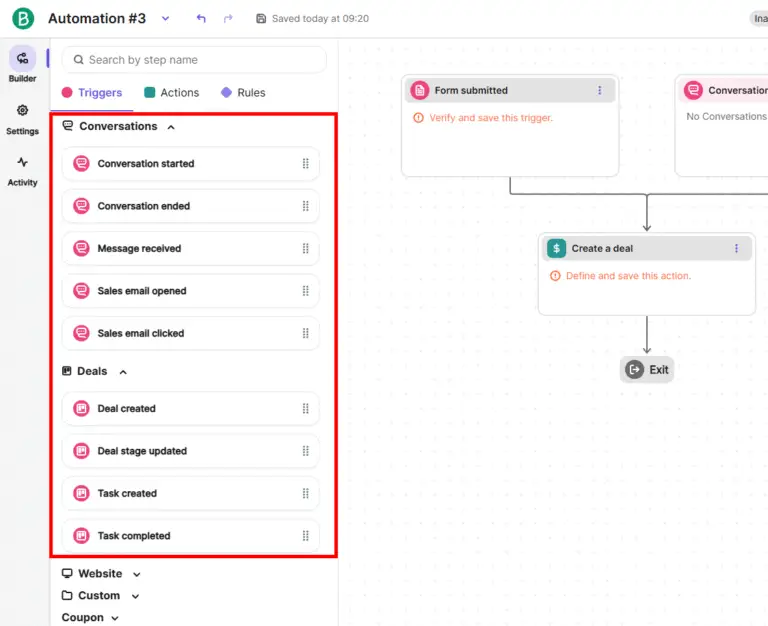
Just like in ActiveCampaign, you can follow these triggers with actions. Brevo provides 5 CRM and sales actions you can use in an automated workflow. A preview of these actions appears in the screenshot below.
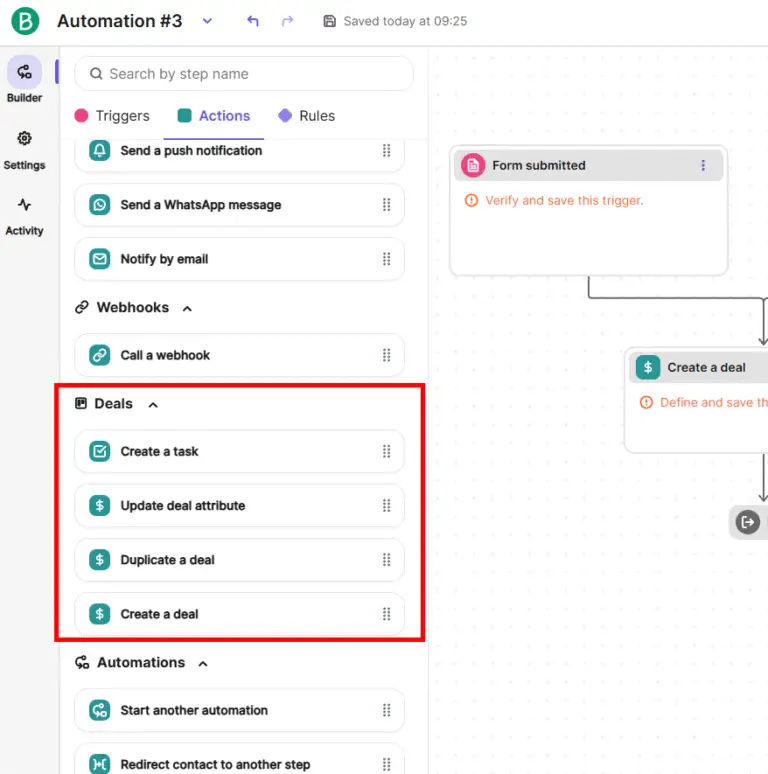
While the system is functional and straightforward, it offers less variety than ActiveCampaign.
Conclusion sales automation functionalities
When it comes to sales automation, Brevo can’t match ActiveCampaign’s range and flexibility. ActiveCampaign simply provides more triggers and more actions, giving marketers far greater freedom to automate their sales processes exactly the way they want.
Winner: ActiveCampaign
Task management
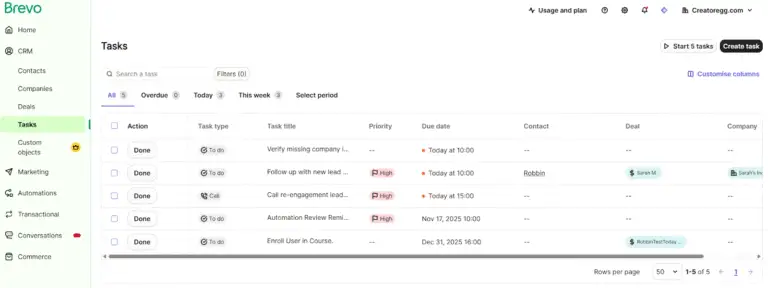
Brevo
Brevo lets you create tasks manually with ease.
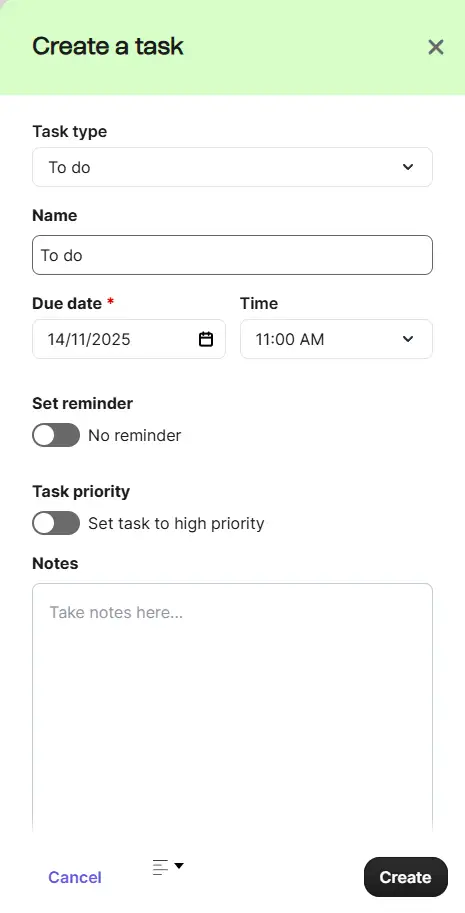
It also supports automatic task creation, though its automation options for tasks aren’t as extensive as those available during manual setup.
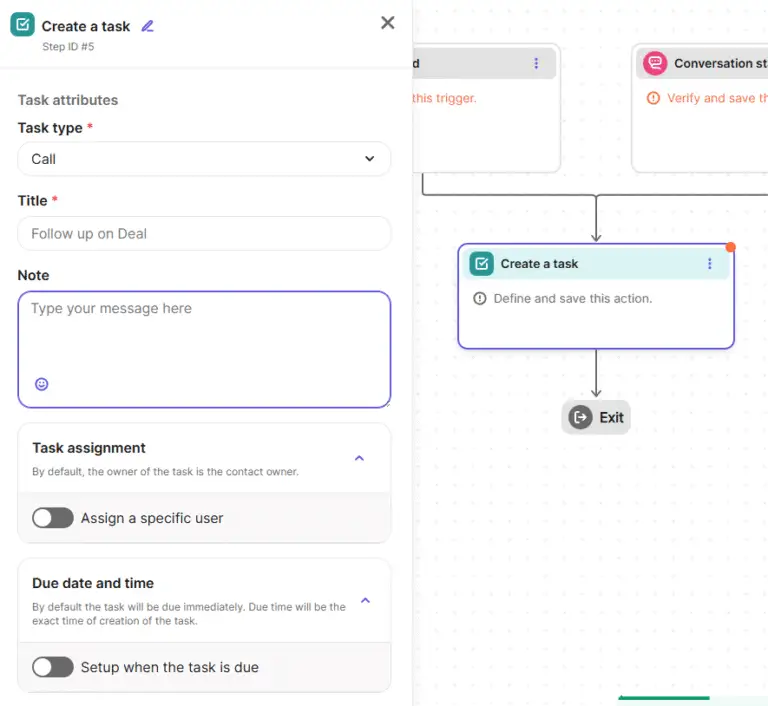
Brevo additionally provides a clean, helpful overview of all your upcoming tasks, giving your to-do list a tidy home.
ActiveCampaign
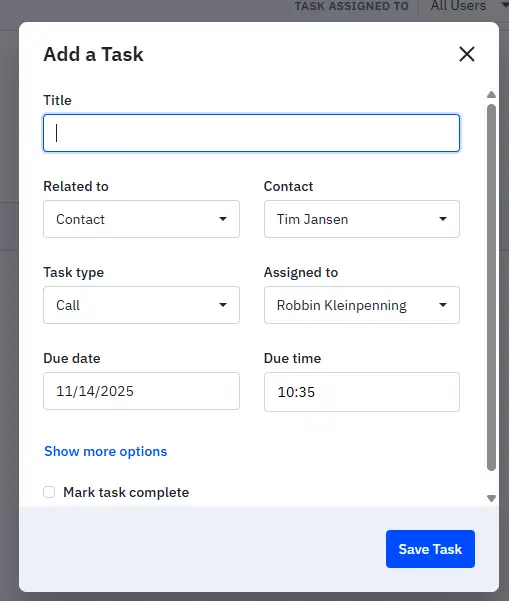
ActiveCampaign also allows you to create tasks manually.
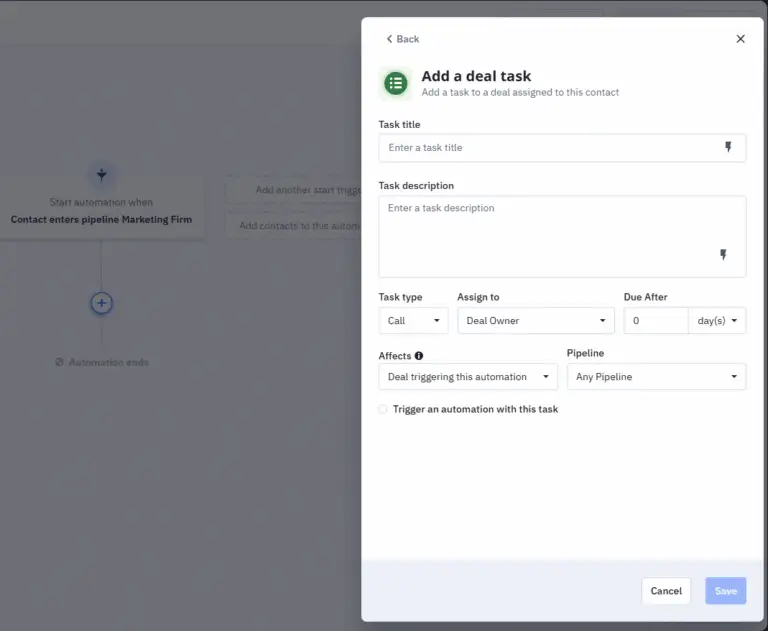
You can set tasks to be created automatically as well.
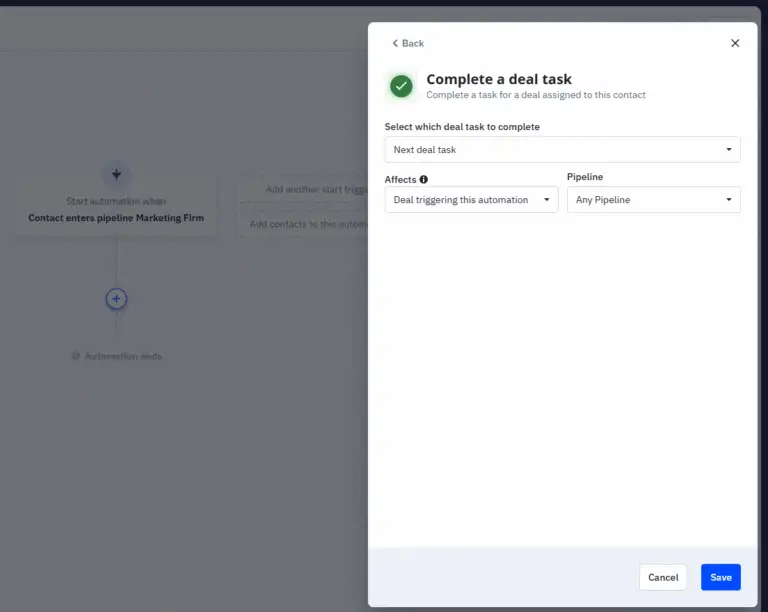
And ActiveCampaign goes one step further by offering automatic task completion, which can tidy up your workflow without you lifting a finger.
Conclusion
Both platforms handle task creation in a similar way, but each carries its own quirks. ActiveCampaign offers slightly more customization and automation options inside the task setup process.
On the other hand, Brevo gives you the ability to create a brand-new contact, company, or deal right inside the task creation flow. ActiveCampaign doesn’t do this, which makes quick task entry for non-existing records a bit less smooth.
In the end, the better experience depends on how you prefer to work and what your task management process looks like. It’s worth testing both to see which one feels more natural to you.
Winner: It’s a draw
Brevo vs ActiveCampaign: Landing Page Features
The short version of this section is that neither ActiveCampaign nor Brevo seems to prioritize landing page features as a core part of their products. Based on my reviews over the past few years, the landing page capabilities in both platforms have barely changed. There haven’t been any notable product updates in this area, which suggests it isn’t a major focus for their development teams. That’s understandable, they don’t position themselves as landing page builders. At their core, both tools are email marketing platforms.
ActiveCampaign is gradually shifting its branding toward being a broader “marketing platform,” while Brevo continues to present itself primarily as an email marketing and CRM platform.
You can find all the detailed comparisons below. I’ve organized this section into multiple parts so you can easily jump to whatever is most relevant to you.
Video Demo
Brevo
I’ve published a demo and tutorial covering Brevo’s landing page features. You can watch it here:
ActiveCampaign
If you want to see me build a landing page using ActiveCampaign, check out the video below. The landing page section begins at the 28:16 mark:
Limitations on Lower Tiers
Brevo
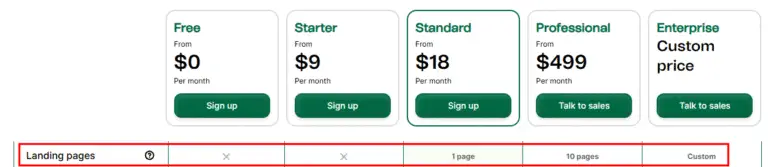
Brevo’s free and Starter plans do not include access to landing page features, meaning you can’t create landing pages on those tiers. The Standard plan provides access to one landing page, while the Professional plan increases that limit to 10.
ActiveCampaign
ActiveCampaign includes landing page functionality starting from the Plus plan and above. The Starter plan does not offer landing pages.

Landing Page Templates
ActiveCampaign
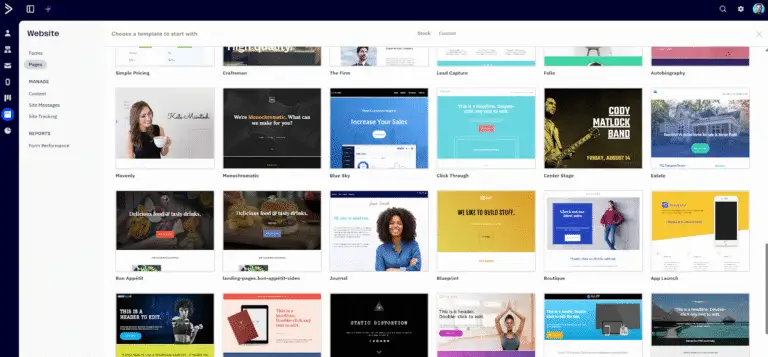
ActiveCampaign offers more than 60 landing page templates you can choose from. You can use them as-is, customize them, or treat them as a starting point for building your own design.
Brevo
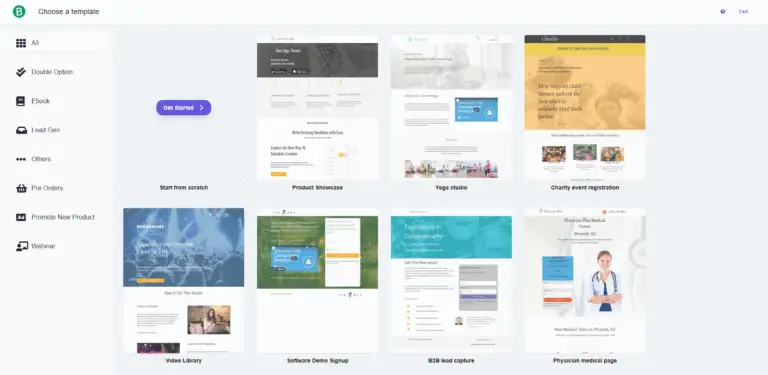
Brevo provides a total of 16 landing page templates.
Landing page builder
ActiveCampaign
ActiveCampaign’s landing page editor is a drag-and-drop builder that works very similarly to its email editor. If you’re already comfortable designing emails in ActiveCampaign, the page builder will feel familiar and easy to work with.
You can add elements like text, images, buttons, videos, forms, spacers, and dividers, and you can structure layouts with rows and columns for flexible multi-column designs. The interface includes both desktop and mobile previews, and one of the standout features is mobile-specific styling, which lets you adjust or hide individual blocks depending on the device. This makes it much easier to create pages that look polished across all screen sizes.
You can also customize colors, fonts, and backgrounds through the Theme settings. It’s a flexible system, though more structured than something like Wix or Webflow. Elements snap into predefined sections rather than allowing completely free-form placement. For example, overlapping two images isn’t possible, you have to work within the grid.
Custom scripts or widgets can only be added through an HTML block. That works fine for things like countdown timers or embedding Calendly, but it isn’t as flexible as a full code-injection feature.
One notable limitation is the lack of built-in A/B testing for landing pages. Unlike email campaigns, the page builder doesn’t include native split testing. If you want to test page variations, you’ll need to create duplicates and manually divide traffic using separate URLs.
Brevo
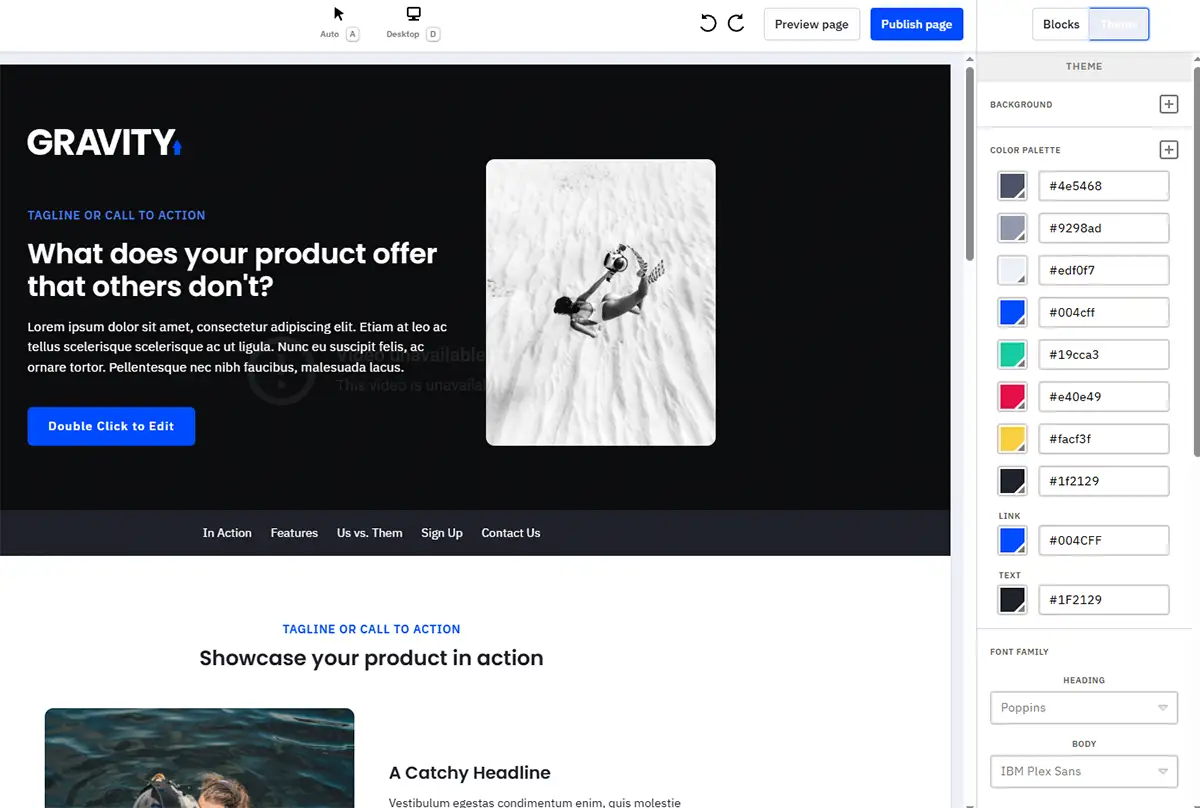
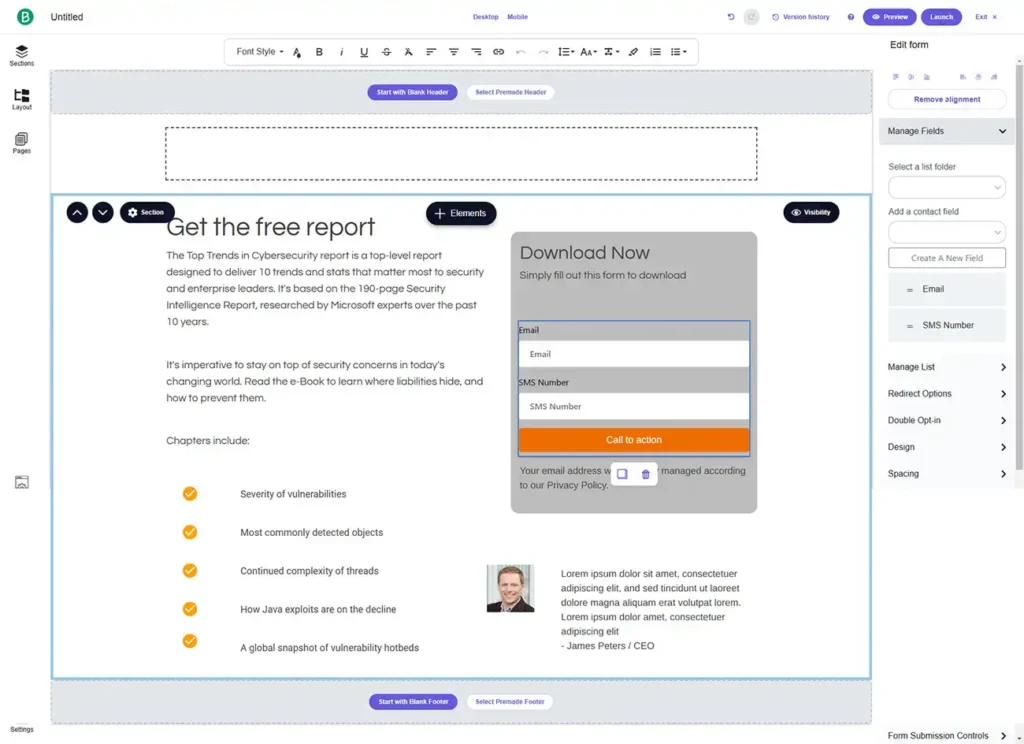
After testing Brevo’s landing page builder, the experience feels outdated and not particularly intuitive. The editor doesn’t have the smoothness or modern feel of other tools, and it’s clear that landing pages aren’t a major focus area for Brevo’s development team.
If landing pages aren’t a central part of your workflow, this might not bother you. But if you depend heavily on building polished, conversion-focused pages, you may find Brevo’s options too limited.
Winner: ActiveCampaign
Custom Domain
ActiveCampaign
When you publish a landing page, ActiveCampaign hosts it on a default domain (something like youraccount.ac-page.com). If you prefer to use your own domain, such as landing.yourdomain.com, you can connect a custom domain directly within your account.

Brevo
In the video below, I demonstrate how to create and connect a custom domain for your Brevo landing pages. The custom domain setup begins at the 16:07 timestamp:
Conclusion
Both Brevo and ActiveCampaign allow you to add a custom domain to your landing pages.
Winner: It’s a draw
Brevo vs ActiveCampaign: Transactional emails
Both Brevo and ActiveCampaign support transactional emails, which is worth highlighting since not every email marketing platform includes this capability.
Transactional emails cover essentials like order confirmations, delivery updates, password resets, account notifications, and other time-sensitive messages triggered by user actions.
If you’re comparing costs, you can find full details on each provider’s pricing pages: Brevo’s here and ActiveCampaign’s here.
Winner: It’s a draw
Free limited-time offer
To help you get the most out of these platforms, I’ve partnered with both Brevo and ActiveCampaign to bring you exclusive, limited-time perks.
Brevo Limited-Time Offer
After reaching out to Brevo, I’m excited to offer my readers 50% off for the first 3 months. This discount is available until [wpcode id=”5614″].
How to redeem:
- Sign up for Brevo using [my link] before [wpcode id=”5614″].
- Enter the code CREATOREGG at checkout to claim your 50% discount.
- Need help? Contact me anytime at info@creatoregg.com.
ActiveCampaign Limited-Time Offer
Although I couldn’t secure a direct discount from ActiveCampaign, I’m offering something many readers value just as much: 6 months of free, personalized email support when you sign up through my link. This exclusive offer is available until [wpcode id=”5614″].
How to redeem:
- Sign up for ActiveCampaign using [my link] before [wpcode id=”5614″].
- After signing up, email me at info@creatoregg.com with your first question, and I’ll guide you step by step.
FAQ about ActiveCampaign’s offer
How does it work?
I track sign-ups through a dedicated dashboard. Be sure to sign up using [my link] so the offer activates automatically.
What kind of support will I receive?
You’ll get personalized email support for six months covering setup, optimization, automations, troubleshooting, and practical guidance tailored to your use case.
Is the support really free, and why offer it?
Yes, it’s completely free. ActiveCampaign compensates me for referrals, which allows me to provide hands-on support at no cost to you.
Will prices be different if I use your link?
No. The pricing is identical. The only difference is that you receive six months of exclusive support when you sign up through my link.
How do I claim my 6 months of support?
Just sign up using [my link] before [wpcode id=”5614″], then email me at info@creatoregg.com with your first question. I’ll take it from there.
If you’re finding this content valuable, share it with a friend, and consider subscribing if you haven’t already for updates on great content.
Sincerely,
Robbin 👋